À mesure que la technologie progresse, il en va de même pour les méthodes que nous utilisons pour partager des informations, tant à l’intérieur qu’à l’extérieur de nos organisations. Le concept de synchronisation et de partage de fichiers en entreprise suscite aujourd’hui un vif intérêt, et pour de bonnes raisons. Alors que les employés dépendent de plus en plus de la possibilité de partager et de collaborer sur des fichiers volumineux, les entreprises découvrent les avantages de fournir les outils qui rendent le partage de fichiers facile et sécurisé afin de rester en conformité avec les lois sur la protection des données et les politiques de l’entreprise.
GoAnywhere MFT propose divers outils conçus pour répondre au mieux à vos besoins de synchronisation, de partage et de collaboration autour des fichiers. De l’envoi d’une pièce jointe volumineuse ponctuelle sous forme de lien dans un e-mail à la collaboration bidirectionnelle, en passant par le suivi des révisions et les commentaires, GoAnywhere MFT aide vos employés à rester productifs tout en réduisant la charge de travail de votre service informatique. Pour les responsables informatiques et de la sécurité, l’objectif ne se limite pas à permettre la collaboration : il s’agit également de veiller à ce que chaque fichier partagé reste protégé, traçable et soumis à une gouvernance complète tout au long du processus.
- GoDrive – Synchronisation et partage de fichiers d’entreprise (EFSS)
- Secure Mail – Envoyez des messages sécurisés et des fichiers de toutes tailles
- Secure Folders – Accédez à distance aux fichiers stockés sur votre serveur
- Cloud Connectors – Intégrez et centralisez les applications Web les plus utilisées
Collaboration sur les fichiers : synchronisation et partage de fichiers en entreprise
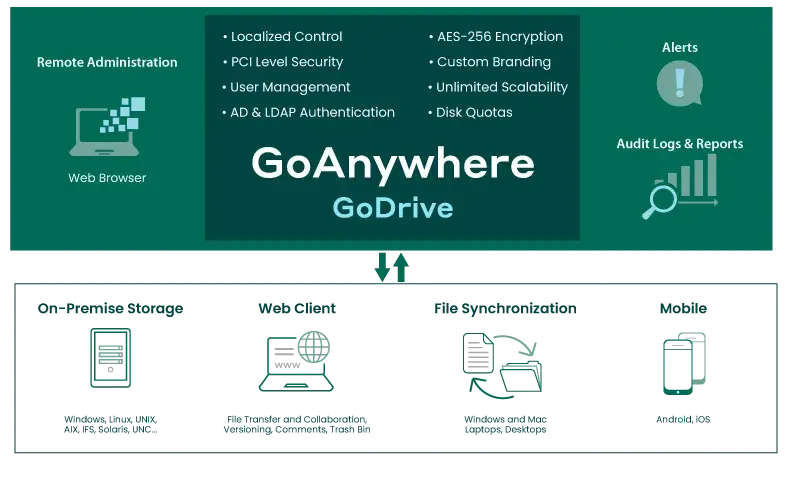
Alors que de nombreuses entreprises restreignent l’accès des employés aux services de partage de fichiers dans le cloud, trouver une solution de remplacement facile à utiliser et sécurisée pour la synchronisation et le partage de fichiers devient primordial.
GoDrive de GoAnywhere est une solution de synchronisation et de partage de fichiers d’entreprise (EFSS), destinée à la fois à vos employés et à vos partenaires commerciaux. Les fonctionnalités avancées de collaboration — notamment le suivi des révisions, les commentaires, les audits, la consultation des médias et le contrôle d’accès des utilisateurs — sont toutes disponibles grâce au système facile à utiliser de GoDrive.
Chiffrement des données
Synchronisation du bureau
Multiplateforme
Facile à déployer
Surveillez l’activité
Cinq comptes utilisateur gratuits
Cinq comptes utilisateur gratuits Secure Mail
Aucuns frais d’abonnement
Évolutivité illimitée
I just wanted to thank you for all your help with getting us moved to GoAnywhere MFT. Your support team does an excellent job! You are very attentive to your customers! I would definitely recommend your product to anyone, not just because it is a great product but also because you can count on having the support when you need it.
Linda Humbert, American Management Corporation
Outils de partage sécurisé de fichiers
Secure Mail
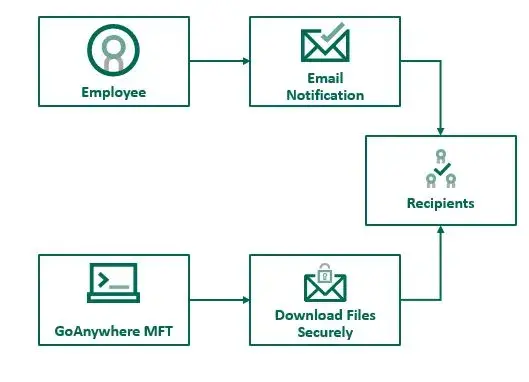
Vous avez besoin d’envoyer des messages ponctuels contenant des fichiers volumineux ou des données sensibles ? Aussi simple que d’envoyer un e-mail, Secure Mail de GoAnywhere vous permet d'envoyer en toute sécurité des messages et des pièces jointes depuis votre réseau, sans aucune limite de taille de fichier.
Parmi les avantages de Secure Mail, citons :
Client Web

Accédez aux fichiers en déplacement
Permettez à vos employés, clients et partenaires commerciaux d’effectuer facilement des transferts de fichiers ad hoc sécurisés et de collaborer efficacement sur des documents.
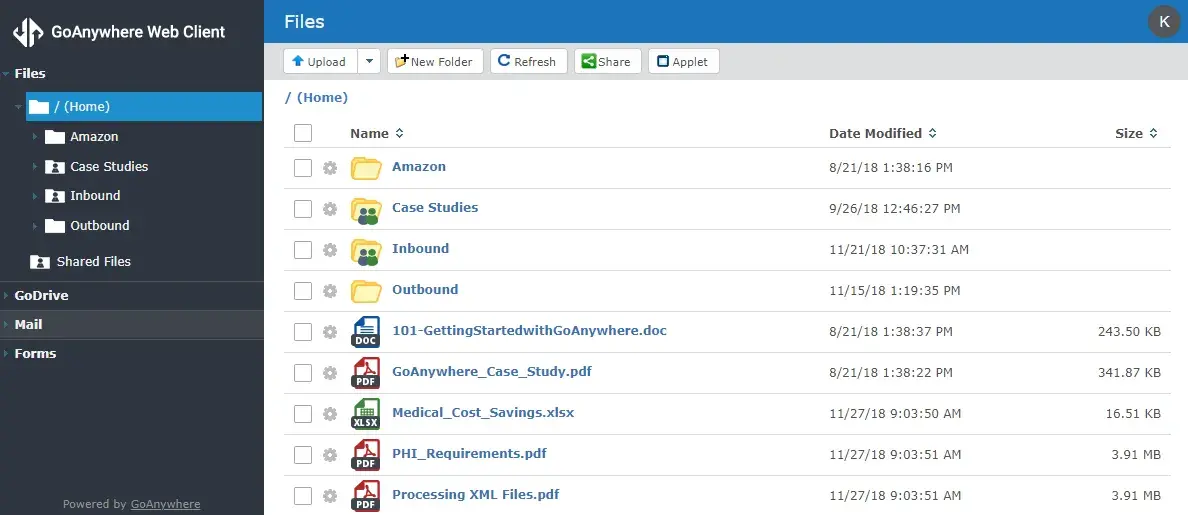
Grâce à un tableau de bord intuitif accessible via navigateur, vos utilisateurs peuvent rapidement téléverser, télécharger et partager des fichiers avec des pistes d’audit complètes. La facilité d’accès via navigateur est un atout majeur pour les équipes distribuées et les partenaires externes, sans renoncer à la visibilité et au contrôle centralisés. Les utilisateurs autorisés peuvent accéder en toute sécurité aux fichiers approuvés sans exposer les autres ressources du réseau. Cela réduit les cas de shadow IT et fournit aux administrateurs un relevé plus clair de l’activité liée aux fichiers.
Secure Folders – Accès Web pratique aux dossiers réseau
Lorsque vous êtes en déplacement, il est important d’avoir accès à des fichiers importants, où que vous soyez.
Définissez sur votre réseau des dossiers accessibles pratiquement partout par les utilisateurs Web autorisés disposant d’un navigateur et d’une connexion Internet grâce à la fonctionnalité Secure Folders de GoAnywhere. Cette fonctionnalité aide les entreprises à étendre l’accès contrôlé aux fichiers du réseau sans ouvrir un accès généralisé aux systèmes internes. Les équipes bénéficient d’un accès à distance tout en préservant la supervision informatique, la gouvernance des accès et la traçabilité.
Les contrôles granulaires vous permettent de définir les autorisations des utilisateurs, tandis que les pistes d’audit détaillées et les rapports vous aident à garantir votre conformité.
Cloud Connectors
Connectez et configurez des intégrations Web grâce à des Cloud Connectors prêts à l’emploi. Automatisez vos données, vos processus et d'autres tâches, et centralisez vos services Web avec GoAnywhere MFT. Ajoutez facilement de nouvelles intégrations : il vous suffit de sélectionner le nouvel outil sur la marketplace des Cloud Connectors, et le tour est joué !
Voici quelques exemples courants de connecteurs :
- SharePoint
- Salesforce
- Dropbox
- Boîte
- Google Drive
Avec Cloud Connectors, les organisations peuvent intégrer leurs activités liées aux fichiers dans le cloud à un environnement de transfert de fichiers gouverné et auditable. Cela leur permet de centraliser les transferts de fichiers entre les applications SaaS, d’améliorer la cohérence et de réduire le travail manuel.
GoAnywhere MFT is super easy and flexible. [We're] able to create and test brand new file transfers in a couple of hours, transfer un-encrypted and encrypted files over SFTP, and it took only minutes to set up [GoAnywhere] to encrypt files using PGP.
George Moisant III, Systems Analyst, Gray Insurance Company
Collaboration EFSS gratuite

Nos solutions sont conçues pour offrir une valeur ajoutée maximale. Par exemple, GoAnywhere MFT vous offre cinq comptes utilisateur GoDrive gratuits et cinq comptes Secure Mail gratuits pour aider vos équipes à se lancer dans une collaboration d’entreprise sécurisée. Les entreprises peuvent ainsi évaluer simplement le partage sécurisé de fichiers avant d’étendre l’accès à d’autres utilisateurs ou équipes. Les grandes entreprises ont la possibilité d’évoluer au-delà des comptes gratuits à mesure que leurs besoins en matière de collaboration et de gouvernance s'intensifient.
Obtenez dès aujourd’hui une solution gratuite de synchronisation et de partage de fichiers pour les entreprises avec GoAnywhere MFT.
FAQ sur le partage de fichiers d’entreprise
Sécurisez vos transferts de fichiers avec GoAnywhere
Commencez un essai gratuit de 30 jours et découvrez si GoAnywhere est la solution adaptée à votre organisation.