Enterprise File Sharing Solutions for Secure Collaboration

GoAnywhere enables secure enterprise file sharing—encrypt files, sync across devices, track revisions, and support ad-hoc sharing while staying compliant.

Media
 
Text

As technology advances, so do the methods we use to share information both inside and outside of our organizations. There's a lot of buzz around enterprise file sync and share these days and for good reason. As employees become increasingly dependent on being able to share and collaborate on large files, companies are discovering the advantages of providing the tools that make file sharing easy and secure to stay compliant with privacy laws and company policies.

GoAnywhere MFT offers a variety of tools designed to make the most of your file sync, share, and collaboration needs. From sending a large ad-hoc attachment as an email link, to allowing back and forth collaboration, to revision tracking and commenting, GoAnywhere MFT helps your employees stay productive while reducing strain on your IT department.

File Collaboration – Enterprise File Sync and Share
Media
Image
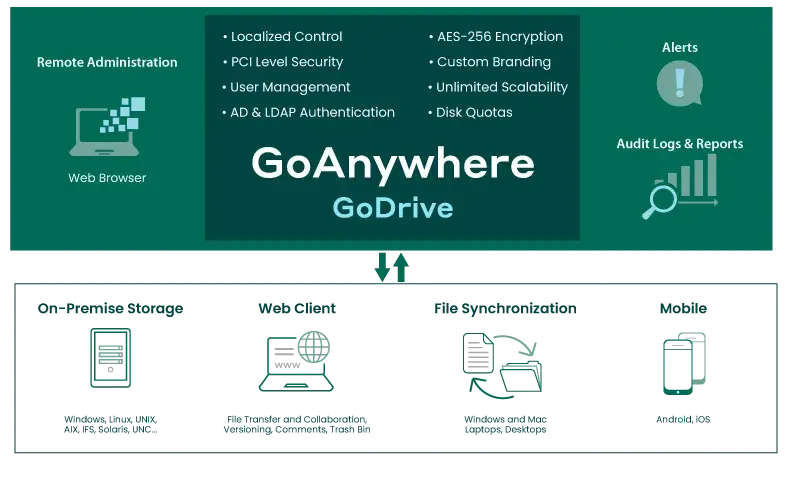
Godrive diagram
Text

As many businesses restrict employee access to cloud-based file sharing services, finding an easy-to-use and secure alternative for file sync and sharing is becoming paramount.

GoDrive by GoAnywhere is an Enterprise File Sync and Sharing (EFSS) solution for both your employees and your trading partners. Advanced collaboration features including revision tracking, commenting, auditing, media viewing, and user access control are all GoDrive's easy-to-use system.

Data encryption

Desktop synchronization

Multi-platform

Easy to deploy

Monitor activity

Five free user accounts

Five free Secure Mail user accounts

No subscription fees

Unlimited scalability

I just wanted to thank you for all your help with getting us moved to GoAnywhere MFT. Your support team does an excellent job! You are very attentive to your customers! I would definitely recommend your product to anyone, not just because it is a great product but also because you can count on having the support when you need it.

Linda Humbert, American Management Corporation

Secure File Sharing Tools
Image
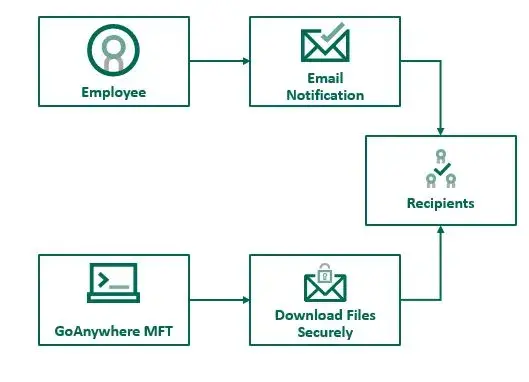
secure mail flow

Secure Mail

Text

Need to send ad-hoc messages with large files or sensitive data? As simple as sending an email, Secure Mail by GoAnywhere can help you securely send messages and attachments from your network — with no file size restrictions.

Benefits of Secure Mail include:

Web client to send and manage Secure Mail messages

Microsoft Outlook plugin for sending Secure Mail

Send multiple files in a single package

Brand messages with your own logo, colors, fonts

Control maximum downloads and access

Set expiration dates

View notifications and audit trails

Allow recipient to reply back securely

Web Client

Media
Image
Screenshot of GoAnywhere Web Client
Text

Access Files On-The-Go

Make it easy for your employees, customers and trading partners to perform secure ad-hoc file transfers and collaborate on documents efficiently.

Through an intuitive browser-based dashboard, your users can quickly upload, download and share files with full audit trails.

Read more about Collaboration in GoAnywhere MFT > 

Secure Folders – Convenient Web Access to Network Folders
Media
Image
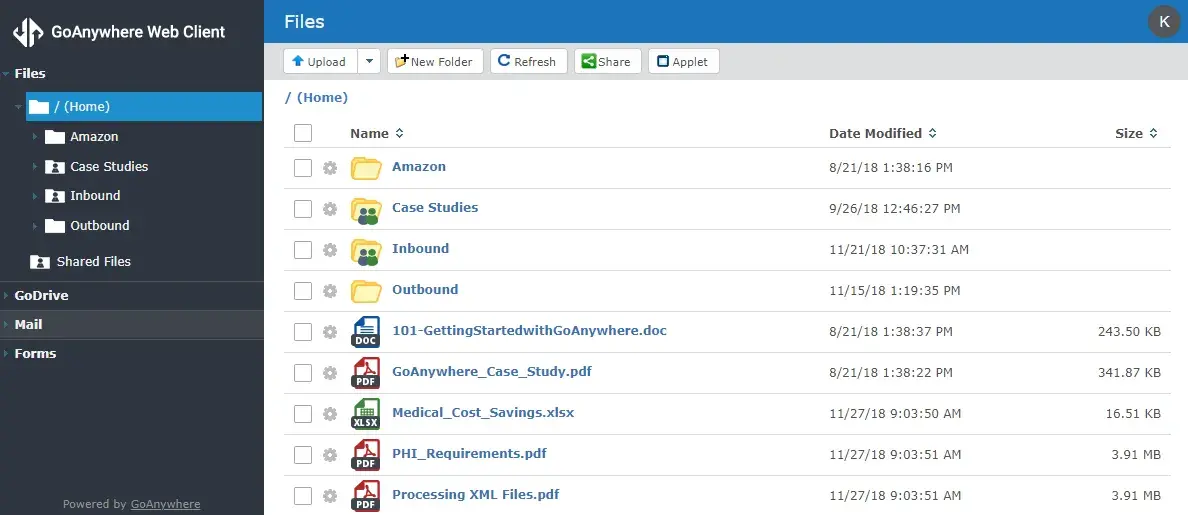
Screenshot of GoAnywhere MFT Secure Folders
Text

When you're on-the-go, it's important to have access to important files — no matter where you are.

Define folders on your network that can be accessed virtually anywhere by authorized web users with a browser and internet connection with Secure Folders by GoAnywhere.

Granular controls allow you to specify user permissions while detailed audit trails and reporting helps you maintain compliance.

See how to use Secure Folders >

Cloud Connectors

Media
 
Text

Connect and configure web integrations with out-of-the-box Cloud Connectors. Automate your data, processes, and other tasks, and centralize your web services with GoAnywhere MFT. Add new integrations easily – simply select the new tool from the Cloud Connector Marketplace, and you’re good to go!

More about Cloud Integrations >

GoAnywhere MFT is super easy and flexible. [We're] able to create and test brand new file transfers in a couple of hours, transfer un-encrypted and encrypted files over SFTP, and it took only minutes to set up [GoAnywhere] to encrypt files using PGP.

George Moisant III, Systems Analyst, Gray Insurance Company

EFSS Collaboration for Free

Image
Ten user icons in a row


Some say the best things in life are free. GoAnywhere MFT gives you five free GoDrive user accounts and five free Secure Mail accounts. It's perfect for small companies and groups who need to collaborate and share files but need a high level of security and local control.

Get a free Enterprise File Sync and Sharing solution with GoAnywhere MFT today.

Enterprise File Sharing FAQs

Enterprise file sharing refers to secure, controlled methods for exchanging files within and outside an organization, to help meet business needs for security, compliance, and collaboration. Unlike consumer-grade tools, enterprise solutions provide:

  • Centralized Management: IT teams can monitor, control, and audit all file transfers.

  • Advanced Security: Encryption for data in transit and at rest, plus features like Multi-Factor Authentication (MFA) and Role-Based Access Control (RBAC).

  • Compliance Support: Built-in controls and reporting to meet regulations such as HIPAA, GDPR, and PCI DSS.

  • Integration: Connects with enterprise systems (Active Directory, ERP, CRM) for seamless workflows.

  • Scalability: Handles large volumes of data and supports distributed teams securely.

Solutions like GoAnywhere MFT and EFSS allow organizations to share files securely via web portals, mobile apps, and automated workflows while maintaining full visibility and compliance.

Consumer File Sharing tools (e.g., Dropbox, Google Drive) are designed for personal use. They prioritize convenience and ease of sharing but often lack advanced security, compliance, and centralized management features. Access controls are basic, and auditing is minimal.

Enterprise File Sync and Share (EFSS) solutions, on the other hand, are intentionally built for business environments. They provide:

  • Role-Based Access Control (RBAC) 

  • Multi-Factor Authentication (MFA)

  • Encryption for data in transit and at rest.

  • Detailed audit logs for compliance with regulations like HIPAA, GDPR, and PCI DSS.

  • Integration with enterprise directories (e.g., Active Directory) for centralized identity management.

  • Policy enforcement for data retention, sharing restrictions, and governance.

GoAnywhere EFSS offers secure file sharing with granular permissions, compliance templates, and automated workflows—features not typically found in consumer-grade tools.

Enterprise file sharing platforms enable secure collaboration by combining robust security controls with productivity features that allow teams to work together without compromising data protection. Here’s how they achieve this: 

1. End-to-End Encryption

  • Files are encrypted in transit and at rest using strong algorithms like AES-256 and SSL/TLS.

  • This ensures sensitive data remains protected during sharing and storage.

2. Role-Based Access Control (RBAC)

  • Permissions are assigned based on user roles or directory groups.

  • Only authorized users can view, edit, or share files, reducing the risk of unauthorized access.

3. Integration with Enterprise Directories

  • Platforms connect with Active Directory or LDAP for centralized identity management.

  • Supports Single Sign-On (SSO) and Multi-Factor Authentication (MFA) for secure user authentication.

4. Granular Sharing Controls

  • Features like password-protected links, expiration dates, and download limits allow secure external collaboration.

  • Administrators can enforce data loss prevention (DLP) policies to prevent accidental leaks.

5. Audit Logging and Compliance

  • Every file action—upload, download, share—is logged for audit trails.

  • Helps meet compliance requirements for HIPAA, GDPR, and PCI DSS.

6. Secure Collaboration Features

  • Real-time file sync and version control for teams.

  • Secure portals and mobile apps for remote collaboration without exposing data to consumer-grade tools.

GoAnywhere EFSS supports secure collaboration by offering encrypted file sharing, RBAC, compliance templates, and automated workflows—all integrated with enterprise systems for full governance.

Enterprises should look for file sharing solutions that provide strong security and compliance controls. Key features include:

  • End-to-End Encryption: Protects data in transit and at rest using AES-256 and SSL/TLS.

  • Role-Based Access Control (RBAC): Assigns permissions based on user roles or directory groups to enforce least privilege.

  • Multi-Factor Authentication (MFA): Adds an extra layer of identity verification for users and administrators.

  • Secure Protocols: Supports SFTP, FTPS, and HTTPS for secure file transfers.

  • Granular Sharing Controls: Provides options like password-protected links, expiration dates, and download limits for external sharing.

  • Audit Logging and Reporting: Delivers comprehensive logs for all file activities to meet compliance requirements (HIPAA, GDPR, PCI DSS).

  • Data Loss Prevention (DLP): Enforces policies to prevent unauthorized sharing or accidental leaks.

  • Integration with Enterprise Directories: Provides support for Active Directory/LDAP and Single Sign-On (SSO) for centralized identity management.

  • Compliance Templates: Includes built-in configurations for regulatory frameworks to simplify adherence.

GoAnywhere EFSS includes all these features plus automated workflows and compliance-ready templates, making it ideal for secure enterprise collaboration.

Modern enterprise file sharing (and EFSS/MFT) platforms like GoAnywhere MFT integrate through several layers so your files, identities, apps, and policies stay in sync:

  1. Identity and Access (SSO/Directory): Integrate with corporate identity providers (e.g., AD/LDAP, SAML, OAuth/MFA) so users authenticate with existing credentials and inherit group‑based permissions; this underpins RBAC and least‑privilege access across shares and portals.

  1. Prebuilt Connectors to Business Apps: Use out‑of‑the‑box integrations or cloud connectors, for SharePoint, Microsoft Dynamics 365, Salesforce, Box, Dropbox and more to push/pull content without custom code; connectors handle file movement in both directions and can be scheduled or event‑driven. 

  1. API Integration (REST/SOAP): Expose and consume REST/SOAP APIs to automate end‑to‑end workflows—e.g., call a REST service, pull JSON/XML, translate data, and load it to downstream systems—while retaining encryption and full audit trails. Platforms can even act as lightweight API gateways/middleware when a full gateway isn’t required.

  1. Storage and Cloud Services: Connect securely to internal file shares, Amazon S3 buckets, and cloud repositories; transfers can be initiated by the platform or remotely via secure clients/agents, with options for acceleration when large data sets or high‑latency links are involved. 

  1. Data Translation & ETL: Built‑in tasks translate between common formats (CSV, XLS, JSON, XML, fixed‑width), so integrations with ERPs/CRMs or partner flows don’t require brittle scripts. 

  1. Automation and Orchestration: Leverage schedulers, folder monitoring, triggers, and advanced workflows to orchestrate multi‑step processes (encrypt, rename, zip, route, notify), integrating with internal apps and external partners consistently. 

  1. Security and Network Integration: Deploy reverse proxy/DMZ gateway patterns, connectors, and agents to meet firewall constraints while preserving end‑to‑end encryption, DLP/AV scanning via ICAP, and centralized logging/reporting for audit.

Secure Your File Movement with GoAnywhere

Start a free 30-day trial and see if GoAnywhere is the right solution for your organization.

Get Started