What is FTPS?
Whether you’re looking to upgrade from your current FTP connection, FTP file transfers, or have new protocol requirements from a trading partner or customer, you might be wondering what FTPS is. For organizations exchanging sensitive data with trading partners, FTPS can help modernize legacy FTP client workflows while improving confidentiality and authentication. In this article we cover what FTPS is and how it can improve organizational workflows.
FTPS Explained
FTPS stands for File Transfer Protocol Secure, or FTP over SSL/TLS. Currently, SSL is still used in describing secure protocols, even though it is deprecated and insecure. Transport Layer Security (TLS) is the modern replacement and security standard.
At its core, FTPS is a secure file transfer protocol or SSH file transfer protocol (SFTP) that allows you to connect securely with your trading partners, customers, and users. When file transfers are sent, they are exchanged using FTPS and can be authenticated through FTPS-supported methods like passwords, client certificates, and FTP server certificates. Unlike standard FTP, FTPS encrypts the connection, so credentials and file contents are not transmitted in plain text. FTPS may be used in both explicit and implicit modes.
GoAnywhere Glossary: From A to Z
How Does FTPS Work
FTPS works by adding TLS encryption to traditional FTP protocol communications, making them secure. Unlike SFTP, an FTPS client uses separate command and data channels, which can make firewall and network configuration more complex as multiple ports may need to be opened and managed.
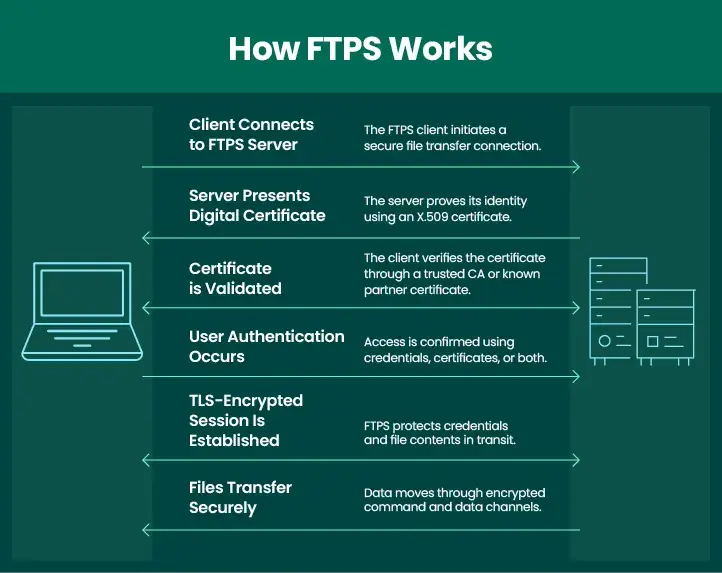
Basic FTPS Workflow
- A client connects to the FTPS server.
- The server presents a digital certificate to verify its identity.
- The client validates the certificate to ensure it is a trusted dedicated server and not an impostor.
- The client authenticates with credentials and/or a client certificate.
- A TLS-encrypted session is established.
- Files are transferred securely over encrypted channels.
While FTPS effectively secures data in transit, organizations may require additional controls, such as automated workflows, audit logging, access management, and compliance monitoring, to meet broader security and regulatory requirements.
Anything Else I Should Know About FTPS?
Before implementing FTPS, organizations should understand how encryption, certificates, compliance needs, and firewall configuration affect deployment.
Algorithms & Authentication
FTPS implements strong algorithms, such as AES, to encrypt file transfers. Modern FTPS deployments should use strong TLS configurations and current cipher suites. For authentication when connecting to trading partner servers and vice versa, FTPS uses a combination of user IDs, passwords, certificates, or SSH keys to verify authenticity. FTPS only encrypts data in transit. To encrypt files at rest another encryption solution must be used or paired with the FTPS client.
Compliance
If compliance is a concern in your organization, you can achieve various security requirements with FTPS, including PCI DSS, HIPAA, HITECH, SOX, and data privacy laws. FTPS can support compliance, but organizations still need centralized logging, access governance, and reporting to demonstrate control.
TLS & Certificates
Although FTP secure is sometimes described as FTP over SSL, modern FTPS should use TLS because SSL is deprecated. FTPS uses TLS to encrypt FTPS server connections. X.509 certificates are used to authenticate these connections. They contain identifiable information like issuer name, subject name, subject public key details, and signature.
When using certificates, they’re considered trustworthy if signed by a known certificate authority (CA) or self-signed by a trading partner. Certificates signed by a CA are easy to validate using the chain of trust that is built into the standard. To validate self-signed certificates, you must have a copy of the trading partner’s public certificate in your trusted key store. Certificate lifecycle management is important because expired or misconfigured certificates can disrupt transfers. MFT platforms can help centralize this certificate management.
Explicit Versus Implicit FTPS
FTPS can operate in either explicit or implicit mode, with the primary difference being how the secure connection is established. Explicit FTPS begins as a standard FTP session and then upgrades to a secure
TLS-encrypted connection through a command such as AUTH TLS.
In contrast, implicit FTPS requires encryption from the start, establishing a TLS connection immediately on a dedicated port before any FTP commands are exchanged. While both methods provide secure file transfer capabilities, explicit FTPS is generally more common in modern environments as it offers greater flexibility and aligns with current security standards. However, the choice between explicit and implicit FTPS is often determined by the requirements of a trading partner or the systems involved in the file transfer process.
One Downside to FTPS
There is one downside to FTPS you should be aware of: FTPS can be difficult to configure through restrictive firewalls as it may require multiple ports for command and data channels. Using managed file transfer tools can help standardize configuration, monitoring, and partner connectivity.
Learn More: What is an FTPS Client?
Does FTPS Differ from Other Secure FTP Protocols?
We already know that, by nature, FTPS is far more secure, reliable, and flexible than basic FTP or homegrown file transfer solutions. But what is the difference between FTPS and a different secure protocol, like SFTP?
Well, we have that answer for you already, wrapped neatly in a detailed blog post:
Which is Better: SFTP vs. FTPS?
If you’re looking at FTPS versus protocols like AS2 or HTTPS, the answer truly depends on your scenario and your trading partners.
For example, are you planning to transmit EDI documents and need a protocol that provides a high degree of security assurance? You may want to look into AS2 for your file transfers. And if you’re exchanging files with websites using HTTP servers, HTTPS may be your best choice for that particular requirement.
Meet Your Requirements with Managed File Transfer
Choosing or using FTPS as your secure file transfer protocol is a smart, efficient way to exchange files in your organization. FTPS can meet secure transfer requirements, but enterprise teams often need centralized control, monitoring, and reporting across all file movement. In order to effectively implement all the features of FTPS and more, you’ll either need to find an FTPS tool or go with a centralized, all-in-one file transfer solution like managed file transfer (MFT).
MFT solutions are used by organizations of all sizes for needs ranging from a few dozen file transfers a week to thousands or more exchanged a day. MFT helps reduce manual work, improves visibility, and standardizes secure transfers across partners and systems.
MFT can support FTPS alongside SFTP, AS2, HTTPS, OpenPGP, and other secure transfer methods. IT teams can be sure MFT will protect their data no matter the size, contents, or frequency of the file transfer.
Watch the On-Demand Webinar: Managed File Transfer 101
Beyond file transfers, some MFT solutions including GoAnywhere MFT, have the ability to handle critical file transfer requirements for sharing large files via an accelerated file transfer protocol, on-premises collaboration features, or even a secure mail plugin for email clients like Outlook.
Having all these options in one product accomplishes the goal of centralizing, managing, and tracking your file exchanges in one place, giving you better file security and peace of mind.
GoAnywhere MFT facilitates using the FTPS protocol for secure file transfer, including guaranteeing delivery of FTPS transfers with auto-retry connection options, auto-resume interrupted file transfers, and integrity checks for successful file transfers.
See What’s Beyond FTP: Secure and Manage Your Data
Whether you need FTPS to meet trading partner requirements or you’re looking to update your FTP implementation to a more secure, modern framework, you’re in this right place. Use this white paper, titled "Beyond FTP: Securing and Managing File Transfers," to discover the options you have outside of scripts and legacy file transfer tools.