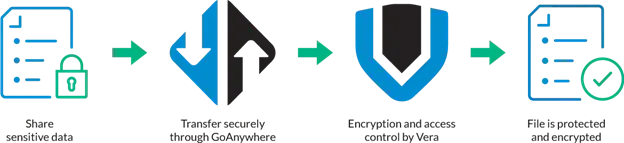
What happens to files after they’re shared via GoAnywhere MFT? Is PGP encryption enough for your organization’s most critical assets? Do you need to take a Zero Trust approach to file protection?
Fortra’s Zero Trust File Transfer bundle gives organizations portable, persistent data security for files of all sizes and sensitivity levels. It’s designed for organizations who need to manage highly sensitive data across complex environments. This bundle combines the power of GoAnywhere MFT, Clearswift Secure ICAP Gateway, and Digital Guardian Secure Collaboration to enable automatic secure file sharing, scan files for malware or viruses, and encrypt them – giving you total control over files wherever they travel.
This software bundle goes beyond the capabilities of traditional encryption, enforcing continuous protection and control over files. This significantly reduces the risk of data leakage while maintaining secure collaboration across internal and external stakeholders.
How does a zero-trust approach improve file security?
Zero trust data access ssumes no file, system, or user can be inherently trusted, requiring continuous validation. While some files can be shared with little concern for security, assets like intellectual property (IP), trade secrets, or sensitive financial information often needs additional protection. Rather than risk these assets being exposed to people who shouldn’t see them, lock them down and ensure they stay in the right hands.
Protect files with a single intuitive solution
Go beyond traditional file-level encryption to ensure all files sent or received by GoAnywhere are automatically scanned for threats, encrypted, and protected – before being shared. Security controls are applied automatically throughout the entire file lifecycle.
Catch viruses and malware
Eliminate threats from the file transfer process and prevent malicious content from entering or leaving your environment. When files are sent or received, scan them for viruses and malware – and block if threats are found. You can also inspect files for unwanted metadata or sensitive information to redact before the remaining file content is shared. Our solution helps support data loss prevention strategies by stopping unwanted intrusions in their tracks.
Collaborate securely with total file access control
You determine who can access files by setting pre-determined rights and authorization. Revoke file access at any time with a perpetual “undo” option –so you’re always in control. Even after the files leave your network, you’ll still be able to keep a close eye on your data. This enables secure external collaboration without compromising your governance.
What Kind of Data Can I Protect with Zero Trust File Transfer?
This bundle offers flexibility to protect all kinds of data, including:
- Intellectual property (IP) and trade secrets, such as manufacturing design files, or music or movie pre-releases
- Personally Identifiable Information (PII)
- Large bodycam footage and surveillance video files for law enforcement
- Financial data and analytics
- M&A documentation
- Project bids
- Regulated data subject to compliance requirements
- Sensitive operational and strategic documents
Zero Trust File Transfer Features
Our Fortra solutions together offer:
- Integrated secure file transfer, threat protection, encryption, and access control - for total file protection
- No end user installation necessary
- Default protection and scanning for sensitive files as they land in MFT and are shared outwardly
- Easy compliance with a full audit trail end-to-end
- Flexible deployment: SaaS, hybrid, or on-premises
- Active file security so you can create and change policies dynamically, to enable or restrict user access in real time. You set the policies to be enforced (collaborate or view-only, copy/paste, print, screenshot, dynamic watermarking, etc.).
- Continuous monitoring and protection for sensitive data
- Compliance support with frameworks such as HIPAA, PCI DSS, and GDPR
- Dynamic policy enforcement based on user roles and risk levels
GUIDE: Taking File Transfer Security to Another Level
Why is extra file security even necessary? As the movement to adopt a Zero Trust security mindset grows, many companies are realizing their file sharing practices are not secure enough. In this guide, we dive into common encryption practices, why today’s DRM tools are much easier to use, and practical steps to improve file security in the modern era.
How Are Customers Using Zero Trust File Transfer?
Here are some of the common ways customers can use this bundle:
- Send or receive large files via email with encryption. Encryption stays with the file even after download; data access can be revoked at any time.
- Add protected files to shared folders. Wrap them in protection so only authorized users can open and download the file, depending on policies, and once files are downloaded, you still have control. This reduces the risk of any unauthorized access.
- Securely upload files to web forms. Enable GoAnywhere to apply secure collaboration to each attachment, sending a protected download link to recipients and only allowing authorized individuals to access.
- Inspect files for threats and sensitive information. Before files are sent or received, catch and sanitize them for viruses or malware. Remove unwanted metadata or sensitive information before continuing to share the file.
- Maintain control after distribution. You have the ability to revoke access whenever you need to, even after the files have been sent. This maintains secure collaboration with your external stakeholders.
More Use Cases
Healthcare
A healthcare organization needed an automatic and secure method to move patient records to and from their SFTP server. Furthermore, they needed to make sure if data leakage occurred, their organization would have total control over those files.
Fortra’s Zero Trust File Transfer bundle gives them the ability to both transfer files securely and revoke access to those records instantly as needed, ensuring patient data confidentiality and regulatory compliance. They now know their files are secure when accessed through Fortra’s secure file transfer solution. And if anyone tries to access the files through a third-party client or a mapped SMB drive, they will not have to worry about records leaking.
Food Distribution
A global food distribution company interacts with thousands of vendors and customers exchanging contracts, pricing, orders, and other documents that contain IP as well as PII. Ensuring information stays protected and in control both within the enterprise and on egress was paramount to their initiative.
The Zero Trust File Transfer bundle provides a data protection platform that can be invoked manually by the user; automates protection of content stored within SMB File Shares, OneDrive, and SharePoint Folders; and invokes protection via GoAnywhere MFT for secure managed file transfer. ensuring patient data confidentiality and regulatory compliance. This means sensitive supply chain data can remain protected even across a large partner ecosystem.
Let Us Help You Improve File Security
The Zero Trust File Transfer bundle adds protection to the data transfer process and can help you make meaningful progress towards your zero trust goals. Share critical information inside and outside your organization with an unprecedented level of management control and security.