How Do FTP and Google Drive Compare For File Transfers?
Organizations need reliable ways to share files internally and externally while maintaining security, governance, and compliance. That is why many teams compare FTP vs. Google Drive when evaluating their file sharing and transfer options.
FTP is a legacy standard designed for server-based transfers and system integrations. Google Drive is a modern cloud storage and collaboration platform built for accessibility and user convenience.
While both support file transfer and file sharing, enterprise priorities have changed. Security, scalability, auditability, automation, and governance now matter as much as usability. Organizations handling sensitive data need to evaluate not only how files move, but also how transfers are monitored, secured, and controlled.
Here, we’ll go over how FTP and Google Drive differ, where each solution works best, and why many enterprises adopt managed file transfer technologies to improve visibility and compliance.
What is FTP and How Does it Work?
FTP – or file transfer protocol – is a traditional method for transferring files between systems over a network. It utilizes a client-server model where users connect to an FTP server to upload, download, or manage files. FTP has long been used for website management, automated data exchanges, and system-to-system integrations. Many organizations still rely on FTP for recurring transfers involving applications, databases, and business partners.
Traditional FTP does not encrypt data, which creates security concerns for sensitive information. To address this, organizations often use FTPS or SFTP, which add encryption and authentication controls.
FTP remains useful for technical teams because it supports scripting, scheduling, and automation. It is commonly used to move FTP files, support backend processes, and handle large file transfers across enterprise environments.
However, FTP environments can become difficult to manage without centralized governance and monitoring. This is why many organizations implement a secure FTP solution that provides stronger encryption, auditing, and FTP access controls.
How Efficient is Google Drive for Enterprises?
Google Drive is a cloud collaboration and storage platform that allows users to sync, share, and access files from browsers and mobile applications. Built within the Google Cloud ecosystem, it emphasizes accessibility and collaboration over structured enterprise transfer management.
Google Drive supports real-time file syncing, user permissions, and link-based sharing. It also integrates with Google Cloud storage services and productivity applications, making it popular among distributed teams. Platforms such as Proton Drive follow a similar model, focusing on cloud-based sharing and accessibility.
The platform offers clear advantages for teams as well as individuals. Users can quickly share content, collaborate on documents, and access files from nearly anywhere. However, enterprise transfer requirements often extend beyond collaboration. Many organizations need automation, detailed audit logs, governance policies, and centralized oversight.
Although Google Drive is a modern collaboration platform, it is not purpose-built for enterprise-grade transfer operations involving regulated or high-volume data exchanges.
What Are the Key Differences Between FTP and Google Drive?
At their core, FTP and Google Drive serve different business needs. FTP focuses on structured server-based transfers and automation, while Google Drive prioritizes collaboration and user-friendly file sharing.
The table below outlines the major differences between the two technologies.
| Feature | FTP | Google Drive |
| Primary Use | Server-based file transfer | Cloud file storage & collaboration |
| Security | Varies depending on protocol | Cloud security controls |
| Automation | Strong | Limited |
| Compliance | Manual | Basic |
| Ease of Use | Technical | User-friendly |
| Enterprise Control | High | Limited |
FTP environments generally provide stronger automation and integration capabilities, while Google Drive offers a more accessible user experience for collaboration-focused workflows. The right choice depends on the organization’s operational and security requirements.
Which option is more secure?
Security depends heavily on how FTP or Google Drive is configured and managed.
Traditional FTP creates risk because it does not encrypt data during transmission. This can expose both credentials and transferred files if intercepted over unsecured networks. SFTP and FTPS improve security by encrypting file transfers and authenticating users.
Google Drive includes encryption, access controls, and audit logging capabilities. Because it operates within a cloud service platform, much of the infrastructure security is managed by Google. Still, cloud-based collaboration tools introduce different risks. Misconfigured sharing permissions, weak account security, and uncontrolled external access can expose sensitive information.
Compliance can also become a major concern for regulated industries. Consumer-oriented collaboration platforms may not provide the governance, workflow visibility, or policy enforcement required for healthcare, finance, or government environments.
Organizations evaluating FTP and Google Drive should focus on encryption, access governance, monitoring, and auditability rather than convenience alone.
Which Platform Handles Automation and Integrations Better?
FTP is generally better suited for automated workflows and system integrations. FTP environments support scripted transfers, scheduled jobs, batch processing, and direct integrations between applications. Many organizations use FTP to automate recurring exchanges with vendors, customers, and internal systems.
Google Drive is designed primarily for collaboration. While APIs and integrations exist, automation capabilities are more limited compared to enterprise transfer platforms.
As organizations scale, automation becomes increasingly important. Security teams need visibility into how files move, where sensitive data is stored, and who accessed transferred content. This is why many enterprises adopt file transfer automation technologies that centralize workflows, monitoring, and policy enforcement.
Which Solution Better Supports Compliance and Governance?
Compliance and governance requirements often determine whether FTP or Google Drive is suitable for enterprise use. FTP can support compliance initiatives when organizations properly implement encryption, authentication, logging, and access controls. At the same time, manual oversight can become difficult across distributed environments.
Google Drive provides basic sharing controls and audit capabilities, but regulated industries often require more advanced governance and reporting functionality. Healthcare, finance, and government organizations frequently need detailed audit logs, centralized access governance, encryption enforcement, and visibility into transfer activity. These requirements are difficult to manage through standard collaboration platforms alone.
Organizations handling regulated data should carefully evaluate how each solution supports their specific compliance frameworks, retention policies, and security controls.
When Should Organizations Use FTP?
FTP is still valuable for system-to-system transfers, automated workflows, and legacy infrastructure environments. Organizations often rely on it when they need to transfer data between servers, applications, and business systems without manual intervention. Technical teams may also rely on FTP compatibility to support existing infrastructure and integrations.
FTP is particularly effective for recurring transfers involving structured workflows or high-volume data movement. It also works well for moving a large file between enterprise systems. That said, it’s necessary to implement encryption, monitoring, and governance controls to reduce operational and compliance risk.
What is a More Secure Alternative for Enterprise File Transfers?
Many organizations find that neither standalone FTP nor consumer cloud collaboration platforms fully meet enterprise security and compliance requirements.
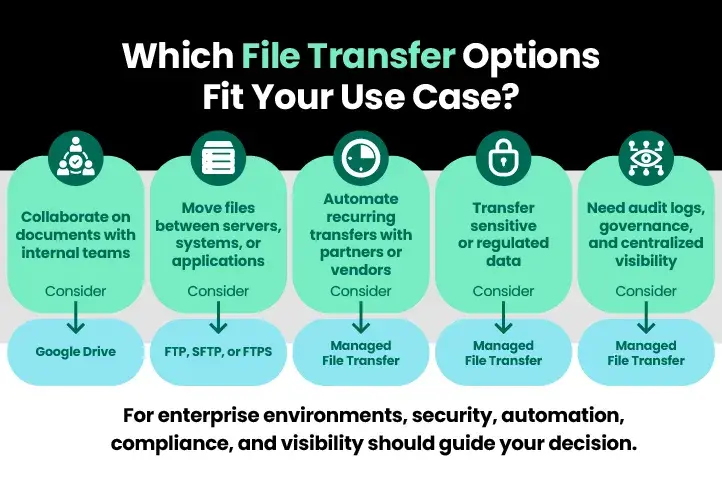
Managed file transfer solutions provide a more secure and centralized alternative. Modern MFT solutions combine encryption, automation, audit logging, access governance, and centralized administration into a single platform. MFT platforms help organizations improve visibility into transfer activity while reducing manual processes and operational risk. They also support compliance initiatives by providing stronger controls around sensitive data movement.
Solutions such as GoAnywhere MFT support transfers across on-premise systems, cloud applications, and external partners. This becomes increasingly important as organizations adopt hybrid infrastructure and distributed environments. Enterprises looking to modernize secure data exchanges often implement cloud file transfer technologies to manage transfers across both cloud and on-premise systems.
How Can MFT Solutions Improve Security and Compliance?
Ultimately, deciding between FTP and Google Drive comes down to an organization’s security requirements, operational complexity, and compliance obligations. Google Drive works well for collaboration and basic file sharing, while FTP provides stronger automation and system integration capabilities for technical workflows.
At the enterprise level, organizations handling sensitive or regulated data often need more centralized control and visibility than either solution provides independently. Managed file transfer platforms built on secure protocols help bridge that gap. They combine automation, encryption, auditability, and governance controls to support secure enterprise data exchanges at scale.
For organizations comparing FTP vs. Google drive, the most effective approach often involves evaluating how each platform supports compliance, automation, scalability, and long-term security requirements.