There are three main software options for protecting your data. SaaS is a vendor-managed delivery model typically accessed over the Internet, cloud solutions run in hosted computing environments, and on-premises software is hosted in your own infrastructure. Which model is right for your organization depends on how much infrastructure control your organization needs, who should manage the software, and how quickly requirements may change.
SaaS, Cloud, and On-Premises Deployment Explained
Organizations can run software on-premises, host it in cloud infrastructure, or consume it as a vendor-managed SaaS application.
The right option for your organization, however, will depend on your current operating setup, how much time your team can dedicate to upgrades and maintenance, and how flexible you need your solution to be.
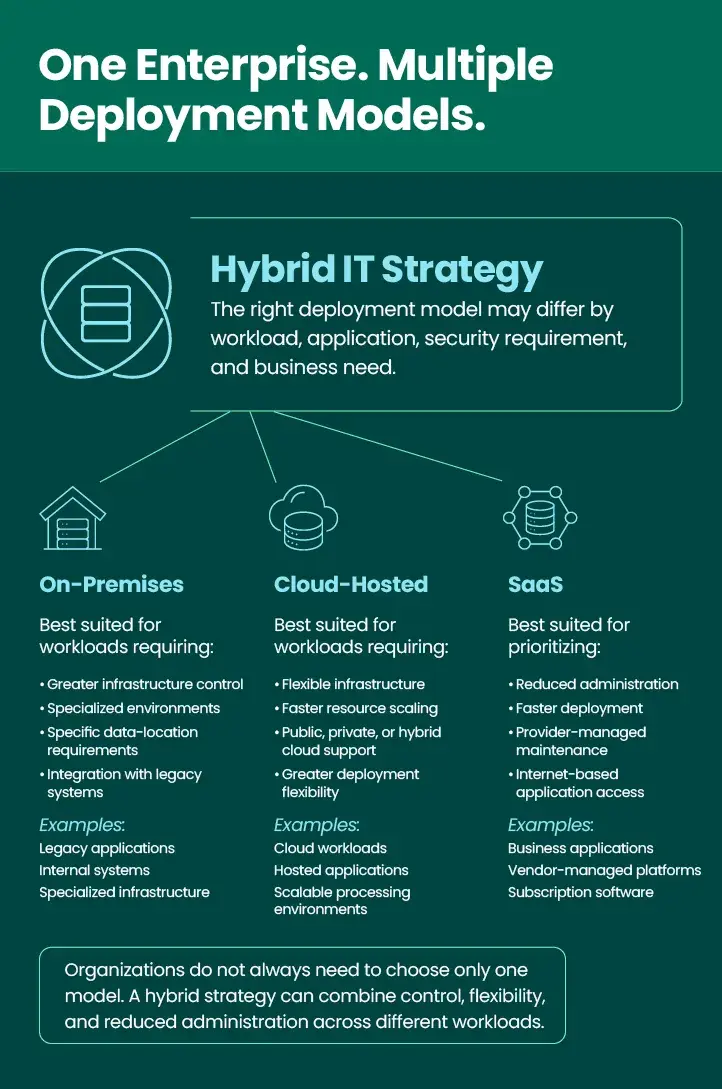
Increasingly, organizations use a hybrid mix of on-premises systems, cloud infrastructure, and SaaS applications. It’s important to understand the benefits of each in order to build the most efficient and functional hybrid IT strategy. Because the three models can overlap, the most important question is often not which one is universally best, but which model fits a specific workload or business requirement.
These are the top fundamental ways to manage your technology and how they vary:
What is On-Premises Deployment?
On-premises is historically the traditional way organizations have purchased and implemented software.
With on-premises:
- Licensing models vary, with some requiring subscriptions or recurring support fees.
- The software runs on infrastructure your organization owns or controls.
- Your team manages the servers, storage, data security, backups, upgrades, and availability.
- You have greater control over configuration, data location, and integration with internal systems.
- Scaling may require additional infrastructure, planning, and internal resources.
- Deployment and maintenance timelines depend more heavily on your internal IT team.
- On-premises environments can be a strong fit for organizations with specialized infrastructure or data-location requirements.
Related Reading: How GoAnywhere MFT Can Help You Transition to the Cloud
What is Cloud Deployment?
Cloud software deployment means software or infrastructure runs in a hosted computing environment rather than entirely within an organization’s local data center. Depending on the model, the cloud provider may manage only the underlying infrastructure while the customer remains responsible for the application, configuration, data, and access controls. SaaS is one type of cloud-based solution, but not every cloud deployment is SaaS.
With the cloud:
- Physical infrastructure is hosted in a cloud environment rather than entirely in your local data center.
- Organizations can scale computing and storage resources without purchasing all underlying hardware.
- Responsibility is shared between the cloud provider and the customer based on the service model.
- Deployments can support public cloud, private cloud, and hybrid cloud infrastructure strategies.
- Your organization may still manage the application, operating system, security configuration, and data.
- Resources can often scale more quickly than traditional hardware-based environments.
Related Reading: Secure Your Cloud Data
What is SaaS?
SaaS is a cloud-based software delivery model, not a completely separate type of infrastructure from the cloud. The primary distinction is the amount of application management handled by the provider.
With SaaS applications:
- There’s minimal setup required before you can use the software as intended.
- Upfront infrastructure requirements can be reduced and costs shifted toward a predictable subscription model. SaaS solutions don’t demand as much from IT staff, since the provider takes care of maintenance and management.
- Subscription pricing also allows for budget planning and to spread costs over time.
- You can access the solution from anywhere and on any device; all you need is an internet connection.
- The provider manages the application infrastructure, maintenance, and software updates.
- Your team remains responsible for user access, configuration, and appropriate data governance.
- Capacity and features can often scale without deploying additional internal infrastructure.
- SaaS can shorten deployment timelines compared with traditional software that is self-managed.
Related Reading: 5 Advantages of Using SaaS
From A to Z: GoAnywhere Glossary
SaaS vs. Cloud vs. On-Premises Comparison
Here is a visualization of some of the key differences between these three approaches:
Factor | On-Premises | Cloud-Hosted | SaaS |
Infrastructure | Organization-managed | Hosted in cloud infrastructure | Provider-managed |
Application Management | Primarily customer | Often customer or shared | Primarily provider |
Deployment Speed | Typically slower | Faster than traditional hardware deployment | Often fastest |
Control | Highest infrastructure control | Flexible, with shared responsibility | Less infrastructure control |
Scalability | Requires internal planning and resources | Resources can scale more dynamically | Typically subscription or usage-based |
Maintenance | Customer-managed | Shared depending on model | Provider-managed |
Cost Model | Capital and/or subscription costs | Usage, subscription, or reserved capacity | Subscription-based |
Best Fit | High-control or specialized environments | Flexible infrastructure needs | Organizations prioritizing simplicity and reduced administration |
When making a selection, it can be helpful to note that on-premises generally offers greater infrastructure control; cloud hosting provides more flexibility; and SaaS places the most operational responsibility on the provider.
How to Choose Between SaaS, Cloud, and On-Premises
Rather than trying to force every application into a singular deployment model, organizations should evaluate each workload individually based on considerations such as:
- Security requirements
- Compliance obligations
- Data location
- Internal IT resources
- Customization needs
- Existing infrastructure
- Scalability
- Availability requirements
- Integration needs
- Budget model
Different workloads may require different deployment models. For example, highly customized legacy applications may remain on-premises, scalable data-processing workloads may move to cloud computing infrastructure, and business applications may be consumed as SaaS. The best strategy balances operational control with the internal resources needed to maintain it. With a hybrid approach, legacy systems can stay on-premises, new workloads can move to the cloud, and some software may be consumed as SaaS.
GoAnywhere is a Triple Threat for Secure File Transfer
GoAnywhere MFT can support your IT strategy and help you on your journey towards the cloud, wherever you are in your infrastructure strategy. Organizations can deploy GoAnywhere within their own environment, run it in private cloud infrastructure, or use MFTaaS for a vendor-managed experience. This flexibility can support hybrid IT strategies where sensitive data, legacy systems, cloud applications, and partner workflows span multiple environments.
Give GoAnywhere a try, where you can deploy on-premises, in the cloud, or via MFTaaS.