When discussing secure networking and file transfers, IT professionals often encounter the comparison of TCP vs SSH. At first glance, these technologies may seem related, or even interchangeable, as they frequently work together in network communications. However, TCP and SSH serve very different purposes.
People often compare TCP and SSH, as SSH typically operates over TCP, leading some to assume they serve the same purpose. This relationship leads to confusion about whether they are competing protocols or different versions of the same technology. Instead, think of these two protocols as functioning at different layers of the networking stack and complementing one another.
The simplest way to understand them is this:
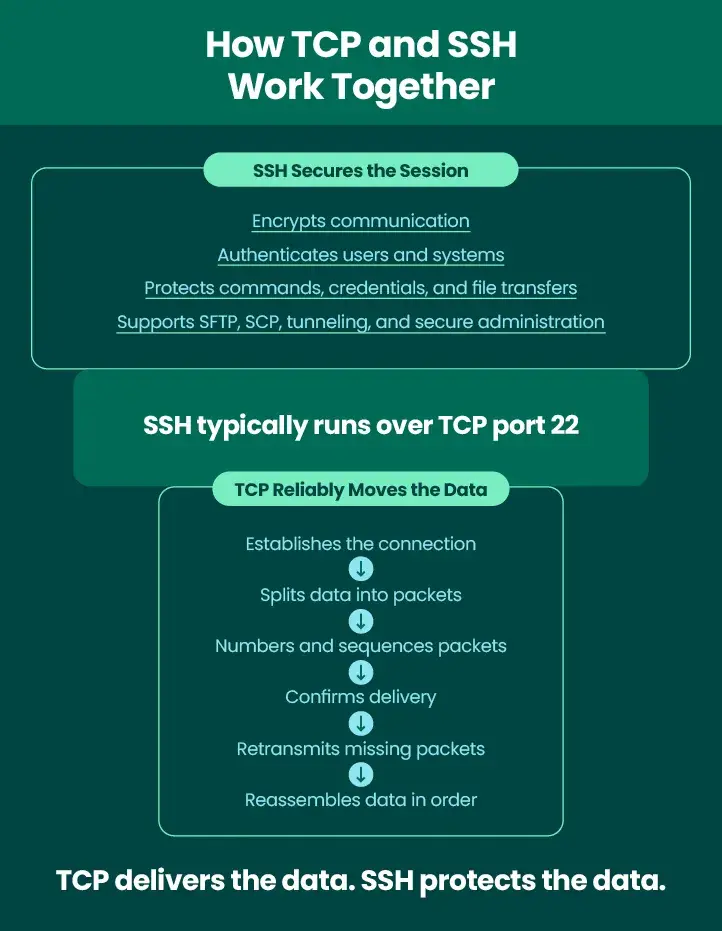
- TCP helps reliably move data between systems, and SSH secures access and communication between systems.
- TCP ensures data reaches its destination accurately and in the correct order. SSH protects that data through encryption, authentication, and integrity checks.
This article explains what TCP and SSH are, how they work, where they fit within the networking stack, and how SSH relies on TCP to support secure remote administration and secure file transfer operations.
What Is TCP?
TCP stands for Transmission Control Protocol. It is one of the core communication protocols used on modern networks and the internet. TCP is a transport-layer protocol responsible for reliably delivering data between devices. Whether users are browsing websites, sending emails, or transferring files, TCP often serves as the foundation that moves information between systems.
At a high level, TCP works by breaking data into packets, sending packets across the network, confirming packet delivery, retransmitting missing packets, and reassembling data in the correct order. This process creates a reliable TCP connection between devices and helps ensure data arrives accurately, even when network disruptions occur.
TCP supports many commonly used protocols and services, such as HTTP/HTTPS, FTP, SMTP, SSH, and SFTP.
Without TCP, many business-critical applications would struggle to maintain reliable communication between systems and network devices.
What Is SSH?
SSH stands for Secure Shell. It is a cryptographic protocol designed to provide secure communication over potentially untrusted networks. Organizations use SSH for secure remote access, system administration, command execution, tunneling, and file transfers. SSH focuses on protecting communications through encryption and authentication. An SSH connection session creates an encrypted connection between an
SSH client and an SSH server, preventing unauthorized parties from viewing or modifying transmitted data.
Common SSH use cases include remote server login, secure system administration, SFTP file transfers,
SCP file transfers, SSH tunneling, and SSH port forwarding. Since SSH encrypts communications, it plays an important role in modern network security strategies.
TCP vs SSH
When evaluating TCP vs SSH, the most important thing to understand is that they operate at different layers and solve different problems. TCP is responsible for transporting data reliably across a network. SSH is responsible for securing communications through encryption, authentication, and session management.
A useful way to think about the relationship is TCP is the delivery mechanism and SSH is the secure communication method that uses that delivery mechanism. TCP ensures packets arrive correctly, and SSH protects the contents of those packets.
Category | TCP | SSH |
| Full Name | Transmission Control Protocol | Secure Shell |
| Primary Function | Reliable data transport | Secure remote access and encrypted communication |
| Network Layer | Transport layer | Application layer |
| Encryption | Does not encrypt data by itself | Encrypts session data |
| Authentication | Not designed for user authentication | Supports password, key-based, and other authentication methods |
| Common Uses | Web traffic, email, file transfer, application communication | Remote login, SFTP, SCP, tunneling, secure administration |
| Relationship | Carries data between systems | Usually runs over TCP |
How TCP Works
TCP uses a connection-oriented communication model designed to ensure reliable data delivery. Before data can be transmitted, a connection must be established between a client and a server.
TCP Process
1. Connection Establishment
TCP begins by creating a connection between the client and server. This process establishes communication parameters before any application data is exchanged.
2. Data Segmentation
TCP divides and splits information into smaller data packets that can be transmitted efficiently across the network.
3. Packet Numbering
Each data packet is numbered and receives sequence information. The receiving system then knows how to reconstruct the original data.
4. Transmission
Packets travel across the network through various routers, switches, and other network devices.
5. Acknowledgment
The receiving system confirms and acknowledges which packets arrived successfully.
6. Retransmission
If packets are lost or corrupted, TCP automatically retransmits them.
7. Reassembly
The receiving system places data packets back in the proper sequence to reconstruct the original data.
This process helps TCP to provide reliability, packet sequencing, flow control, error correction, and congestion management. However, TCP does not automatically encrypt data. While TCP protects against transmission errors, it does not provide confidentiality or authentication. Data traveling through a standard TCP connection may still be visible to unauthorized parties if additional security measures are not applied. This limitation is one reason why protocols such as SSH are so important.
How SSH Works Over TCP
SSH uses TCP and typically operates over TCP using TCP port 22, which is also known as the default SSH port. When an SSH session begins, TCP first establishes a reliable network connection. SSH then builds a secure encrypted session on top of that connection.
SSH Process
1. Client Connects to Server
An SSH client initiates communication with an SSH server using the configured SSH port.
2. SSH Handshake Begins
The client and server exchange information needed to establish a secure session.
3. Encryption Negotiation
Both systems negotiate encryption algorithms and cryptographic parameters.
4. Server Verification
The client verifies the server’s identity to help prevent man-in-the-middle attacks.
5. Authentication
Users or systems authenticate through passwords, certificates, or an SSH key.
6. Secure Session Creation
Once authentication succeeds, an encrypted SSH session begins.
Throughout this process, TCP ensures reliable packet delivery and SSH protects the contents of those packets.This division of responsibilities allows organizations to benefit from reliability and security.
Why SSH Needs TCP
SSH relies heavily on TCP, which provides several capabilities that SSH does not attempt to duplicate.
TCP supplies connection establishment, packet ordering, error correction, retransmission, and flow control.
These features create a dependable transport layer for SSH communications. Rather than managing packet delivery itself, SSH focuses on confidentiality, authentication, integrity verification, session security, and access control. This separation of responsibilities makes both protocols more efficient.
For example, when users establish SSH access to a remote server, SSH does not need to worry about whether packets arrive in the correct order. TCP already handles that task. When administrators use SSH-based file transfer technologies, such as SFTP, TCP manages transport reliability and SSH secures the transferred data.
This layered approach is one of the reasons SSH remains a widely trusted protocol for secure communications. SSH also supports advanced networking capabilities such as SSH tunnel creation and SSH port forwarding.
Through port forwarding, organizations can securely route traffic through encrypted SSH sessions, extending secure communications across internal and external systems.
Enterprise Security Considerations
While SSH provides strong security for individual connections, enterprises often require much more than encrypted communication. Large organizations must manage file transfers, user access, compliance requirements, and operational visibility across hundreds or thousands of systems. Critical enterprise requirements can include centralized visibility, access controls, key management, audit logs, error handling,
workflow automation, and compliance reporting.
Managing individual SSH or SFTP connections manually can become increasingly difficult as environments grow. Many organizations find it challenging to track SSH key usage, monitoring transfer activity, managing trading partners, troubleshooting failed transfers, maintaining audit trails, and enforcing governance policies.
Even though SSH provides strong protocol-level protection, organizations often need centralized solutions to manage secure file movement at scale.
This is where Managed File Transfer (MFT) platforms can provide significant value. MFT solutions help organizations standardize, automate, monitor, and secure data exchange workflows, while maintaining support for protocols such as SSH and SFTP.
How GoAnywhere MFT Supports Secure TCP-Based File Transfers
GoAnywhere MFT helps organizations securely exchange data using industry-standard protocols, while providing centralized management and automation capabilities. GoAnywhere supports multiple secure file transfer protocols, such as SFTP, SCP, FTPS, HTTPS, and AS2. Many of these protocols rely on TCP for reliable transport. SFTP uses the SSH protocol to provide encrypted communications while leveraging TCP for reliable packet delivery. However, GoAnywhere extends beyond basic SSH or SFTP functionality by providing enterprise-grade capabilities.
GoAnywhere Capabilities
- Workflow Automation: Automate file transfers and business processes without manual intervention.
- Scheduling: Execute transfers based on predefined schedules and events.
- Encryption: Protect sensitive data both in transit and at rest.
- Key and Certificate Management: Centrally manage credentials, certificates, and SSH key authentication.
- Audit Logging: Maintain detailed records of transfer activity and administrative actions.
- Error Handling: Identify transfer failures quickly and resolve them efficiently.
- Partner Management: Streamline secure data exchanges with external partners.
- Compliance Support: Help satisfy regulatory and security requirements through centralized controls and reporting.
- Service Level Agreement (SLAs): Event-driven contracts tied to a specific source (Monitor, Trigger, or Project) to send an email or launch a workflow when the conditions are met or missed.
These capabilities deliver important business outcomes, such as reduced manual effort and improved operational visibility. Organizations will also find they have stronger security governance and enhanced compliance readiness. By combining secure protocols with automation and centralized management, GoAnywhere helps organizations streamline secure data exchange initiatives.
TCP and SSH Do Work Together, But They Are Not the Same
Understanding TCP vs SSH begins with recognizing that they are not competing technologies. TCP provides reliable data transport between systems. SSH provides encrypted and authenticated communication.
TCP focuses on moving data accurately and efficiently. SSH focuses on protecting that data from unauthorized access or modification. In most implementations, SSH runs over TCP.
TCP creates the reliable connection, while SSH secures the session and supports capabilities such as remote administration, SSH tunneling, SSH port forwarding, and secure file transfers. When viewed together, TCP and SSH are not competitors; they are complementary technologies that work together to deliver secure, reliable communication across modern enterprise networks.
For organizations managing large-scale file movement, protocol security alone may not be enough. Solutions such as GoAnywhere MFT help extend the value of SSH-based transfers through automation, centralized visibility, governance controls, and compliance support.