Encryption is key to securing organizational data in the short term and long. However, there are a few different types of encryption that organizations can use to achieve the optimal level of security. PGP encryption helps organizations protect sensitive information and files, verify who sent them, and detect unauthorized changes. It is commonly used for file exchange between users, systems, and external trading partners. Modern tools may implement the OpenPGP standard, which supports encryption, digital signatures, compression, and key management. Here, we’ll break down how PGP encryption works and how to use it to maintain the safety of your files.
What is PGP Encryption?
PGP, otherwise known as Pretty Good Privacy, is used to encrypt and decrypt files and authenticate encrypted messages through the use of digital signatures. This is especially useful when a protected file must remain encrypted while it is stored, transferred, or exchanged between organizations. Software compatible with PGP encrypt, decrypt, sign, and verify files such as:
- Files exchanged with trading partners
- Financial reports
- Healthcare data
- Customer information
- Data exports
- Sensitive business documents
With its file-level encryption, PGP protects the file itself, rather than solely relying on the transfer connection.
The Pros and Cons of PGP Encryption
PGP offers strong file-level protection and interoperability, but organizations must manage keys and workflows carefully. PGP can be used for the purposes of encrypting emails and files as well as verifying message recipients. Essentially PGP encryption can be a very powerful tool for users. PGP-compatible encryption can provide strong protection when appropriate cryptographic settings and secure key-management practices are used.
However, there are some aspects of PGP encryption that might be seen as a hurdle for organizations to use. Here are some things to consider about PGP encryption:
However, there are some aspects of PGP encryption that might be seen as a hurdle for organizations to use. Here are some things to consider about PGP encryption:
PGP Encryption Hurdles
- Complexity: PGP encryption can be pretty complex so it takes time and effort to exchange complicated messages between users. That complexity can increase when teams manually encrypt, decrypt, sign, verify, and transfer files across multiple users or trading partners. Some employee training may be required. However, secure MFT solutions like GoAnywhere make it as easy as possible for users to employ PGP encryption.
- Key Management: It’s important to understand key management in order to avoid incorrectly using, losing or corrupting PGP keys. If done incorrectly, other users within the organizations as well as vendors and trade partners will be put at risk. Centralized policies and key-management processes can help reduce the risk of incorrect, expired, or compromised keys.
- Manual workflows: Repeatedly encrypting, decrypting, signing, and transferring files by hand can become time-consuming and difficult to scale.
- Trading partner coordination: Organizations need reliable processes for exchanging public keys and communicating key changes with external partners.
- Limited visibility: Without centralized monitoring, teams may have difficulty tracking failed encryption processes or identifying which keys are used by specific workflows.
Related Reading: Getting Started with GoAnywhere’s PGP Key Manager
How to Encrypt with PGP
PGP is complicated but can be easy to use once you get through the initial learning process. The process is guided by a few simple steps. So, how do you encrypt data using PGP encryption? Let’s break it down.
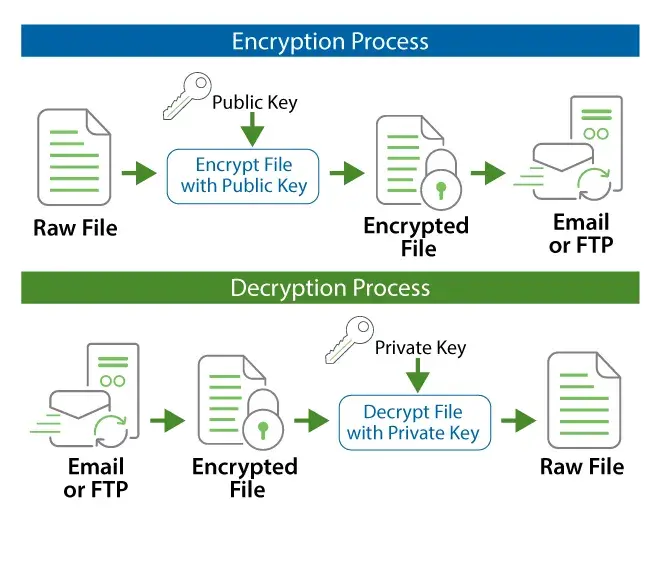
- Obtain the Recipient’s Public Key: Obtain and verify the public key of the person or organization receiving the file. The recipient’s public key is used during encryption, while the corresponding private key remains secret and is used by the recipient to decrypt the data.
- Import the Key and Configure the Encryption Process: Once you’ve obtained the key, users can import the public key to a key vault. Import the verified public key into your approved key manager or encryption software, then configure the PGP file encryption process. Users should then create a project within the software that will be used to encrypt the file/data that you need secured in motion and at rest. When authentication and data integrity verification are needed, the sender can also digitally sign the file using their private key. The recipient can verify the signature using the sender’s public key.
- Verify and Run the Encryption Process: Verify the recipient, public key, file, and any signing settings before running the encryption process. After encryption, transfer the protected file through an approved delivery method. The recipient uses their private key to decrypt the file.
PGP lets users encrypt, decrypt, sign and verify files from their PCs or workstations. An integrated key manager allows anyone to quickly create, import, export, and manage PGP keys needed to encrypt and decrypt files. Best of all, it's intuitive so users can confidently use GoAnywhere’s PGP software.
Raise the Security Level of Your Organization with Open PGP
Although manual PGP encryption may be suitable for the occasional file, recurring enterprise workflows typically require more visibility and automation. The GoAnywhere MFT enterprise platform provides automated encryption, decryption, signing, verification, and file transfer as part of centralized workflows. This helps reduce manual steps while giving administrators greater visibility into encryption activity and key usage. Fortra also offers Open PGP Studio, a free tool for manual encryption, decryption, signing, verification, and key management. To learn more about either of these solutions, reach out and speak with one of our team members today.