
Digital trust is the foundation of secure online communication, business transactions, and managed file transfers. Every time users connect to a secure website, exchange sensitive files, or send protected business documents, they rely on technologies that verify identities before information is shared. At the center of this trust model is the digital certificate.
A digital certificate helps confirm the identity of a server, organization, user, or application before a connection is established. Whether supporting HTTPS websites, FTPS connections, AS2 exchanges, secure email, or automated file transfers, certificates provide assurance that systems are communicating with the intended party.
For organizations exchanging sensitive information, certificate-based authentication helps reduce security risks while supporting compliance requirements and trusted partner communications. Solutions such as Fortra’s GoAnywhere MFT use certificates to help organizations protect data transfers across multiple secure protocols while simplifying administration and monitoring.
What Is a Digital Certificate?
A digital certificate is an electronic digital credential that verifies the identity of a person, server, organization, or system while linking that identity to a public key used for encryption. The certificate serves as proof that the public key belongs to the stated identity, allowing other systems to establish trusted connections.
Each certificate contains identifying information about the certificate holder, along with the public encryption key and details about the organization that issued it. Most certificates are issued by a trusted Certificate Authority, which validates the identity of the requester before creating a signed certificate.
By binding an identity to a public key, certificates allow systems to verify they are communicating with the correct destination before exchanging sensitive information or personal data. This process supports trusted authentication across websites, business applications, APIs, and managed file transfer environments.
Why Are Digital Certificates Important?
Encryption protects information while it travels between systems, yet encryption alone cannot confirm who owns the encrypted connection. A certificate addresses this challenge by establishing trust before secure communication begins.
Without identity verification, attackers could impersonate legitimate systems, intercept communications, or redirect confidential information to unauthorized destinations. Digital certificates help reduce these risks by allowing systems to validate identities before exchanging data. Certificates play an important role in protecting organizations from impersonation attacks, man-in-the-middle attacks, unauthorized system connections, and misrouted sensitive data.
This trust extends across business applications, trading partners, cloud services, internal systems, and automated workflows. For enterprises that exchange regulated information or confidential business files, certificates help create secure connections that support reliable data exchange while meeting security and compliance requirements.
The Digital Certificate Process
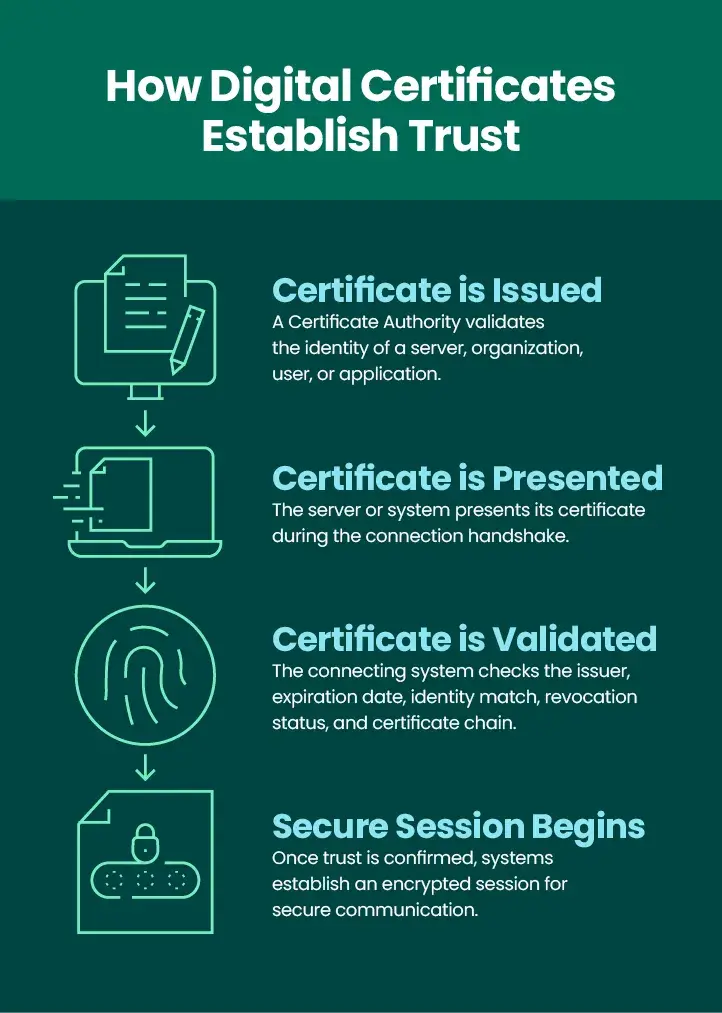
Understanding how digital certificates work, becomes easier when viewed as a series of steps. Each stage helps establish trust before sensitive information is exchanged. Although implementation details vary by protocol, the overall process remains consistent across HTTPS, FTPS, AS2, and many other secure communication technologies.
Step 1: A Certificate Is Issued
The process begins when a Certificate Authority validates the identity of an organization, server, user, or application. After completing the validation process, the Certificate Authority issues a signed certificate that associates the verified identity with a public key. Before issuing the certificate, the requester typically generates a key pair and submits a certificate request, often called a Certificate Signing Request (CSR). The request includes identity information along with the public key that will appear in the finished certificate.
Some organizations also create self-signed certificates for internal environments. While these certificates provide encryption, they are not automatically trusted because no independent authority has verified the identity. Administrators must manually configure trust before systems will accept them. Business-to-business environments frequently use another approach. Trading partners may exchange certificates directly and agree to trust each other’s certificates as part of their security configuration.
Step 2: A System Presents Its Certificate
When a secure connection begins, the server, application, or user presents its certificate to the connecting party during the initial handshake. The receiving system examines the certificate and reviews information that identifies the certificate holder while obtaining the associated public key needed to establish encryption.
This process occurs in many common business scenarios, such as a web server presenting TLS certificates during an HTTPS session or an AS2 trading partner presenting a certificate before exchanging business documents. This can also occur when an FTPS server presents an SSL certificate or TLS certificate when clients connect for secure file transfers. Although each protocol uses certificates differently, the goal remains the same: prove identity before protected communication begins.
Step 3: The Certificate Is Validated
After receiving the certificate, the connecting system performs several validation checks before establishing trust. Typical validation includes verifying that the certificate was issued by a trusted Certificate Authority, confirming that it has not expired, checking that the identity matches the intended server or organization, reviewing revocation status, and validating the certificate chain. If any validation step fails, the connection may be rejected, or a security warning may appear. These safeguards help prevent users and automated systems from communicating with unauthorized endpoints.
Step 4: A Secure Session Is Established
Once validation succeeds, the systems use the public key contained in the certificate to establish a secure encrypted session. During this process, the communicating systems negotiate encryption parameters and typically create a temporary session key that supports efficient encryption for the remainder of the connection.
After the secure session has been established, sensitive information can move safely between the participating systems. Whether transferring business documents, exchanging application data, or authenticating users, the certificate has already fulfilled its primary role by helping both parties establish trust before communication begins.
What Information Is Included in a Digital Certificate?
A digital certificate contains several fields that help systems verify identity and determine whether the certificate should be trusted. Each field serves a specific purpose during authentication and connection validation. Common certificate information includes:
| Certificate Field | Purpose |
| Subject Name | Identifies the organization, server, user, or system associated with the certificate. |
| Issuer | Identifies the certificate authority that issued the certificate. |
| Public Key | Provides the encryption key used during secure session establishment. |
| Serial Number | Supplies a unique identifier assigned by the issuing CA. |
| Expiration Date | Defines the period during which the certificate remains valid. |
| Digital Signature | Confirms that the certificate has not been altered since issuance. |
| Certificate Usage | Specifies how the certificate may be used, such as authentication, encryption, or code signing. |
| Subject Alternative Names | Lists additional domain names or identities protected by the certificate. |
Digital Certificates and Public Key Infrastructure (PKI)
Digital certificates operate within a broader security framework known as public key infrastructure (PKI). PKI consists of the policies, technologies, processes, and administrative roles that create, distribute, validate, manage, and revoke digital certificates throughout their lifecycle. Several components work together to establish trust within a PKI environment.
A Root Certificate Authority serves as the highest level of trust. Operating systems and web browsers include trusted root certificates that allow them to recognize certificates issued by approved authorities. Many public certificate authorities use one or more Intermediate Certificate Authorities to issue certificates on behalf of the Root Certificate Authority. This layered approach helps protect the root authority while supporting large-scale certificate issuance.
When a certificate is presented, systems validate the complete certificate chain from the issued certificate through any intermediate authorities to a trusted root. If the chain cannot be verified, the connection may fail. Each operating system or application maintains a trust store, which contains certificates from trusted authorities. During validation, the presented certificate is compared against this trusted list to determine whether the issuing authority is recognized.
PKI also supports certificate revocation. If a certificate is compromised, replaced, or no longer trusted, administrators can revoke it before its expiration date. Validation processes can check revocation status to help prevent the continued use of compromised credentials.
Together, these components enable organizations to establish trust at scale across websites, enterprise applications, APIs, cloud environments, and managed file transfer platforms. Depending on business requirements, organizations may rely on public certificate authorities, private Certificate Authorities, or certificates exchanged directly between trusted partners.
Types of Digital Certificates
Organizations use several types of digital certificates, with each one supporting a specific authentication or security function. The appropriate certificate depends on the identity being verified and the secure process it supports.
TLS/SSL Certificates
TLS certificates, formerly known as SSL certificate technology, authenticate websites, APIs, and servers while enabling encrypted HTTPS connections. Although the term SSL certificate remains common, modern deployments use the Transport Layer Security (TLS) protocol to protect communications.
Client Certificates
A client certificate authenticates a user, device, or application connecting to a server. Client certificates verify the identity of the connecting party.
Code Signing Certificates
A code signing certificate allows software publishers to digitally sign applications, scripts, or executable files. The resulting digital signature helps users verify that software originated from a trusted publisher and has not been altered after release.
Email Certificates
S/MIME certificates protect business email by encrypting messages and applying an electronic signature. Recipients can verify the sender’s identity while confirming that message contents have remained unchanged during transmission.
Document Signing Certificates
Document signing certificates allow organizations and individuals to apply legally recognized digital signatures to electronic documents. These certificates support identity verification while helping preserve document integrity throughout approval workflows.
AS2 Certificates
AS2 certificates support secure business-to-business communications by enabling encryption, digital signatures, and authentication between trading partners. They are essential for organizations exchanging electronic business documents through AS2.
How Digital Certificates Support Secure File Transfers
Digital certificates play an essential role in secure file transfer by helping authenticate servers, clients, and trading partners before sensitive information is exchanged. This trust helps organizations protect confidential business information while supporting compliance requirements and operational reliability. Several secure file transfer protocols rely on certificates, such as FTPS, HTTPS, AS2, AS4, and S/MIME.
Within AS2 environments, certificates perform multiple security functions. They encrypt transmitted messages, create a digital signature that verifies message integrity, and authenticate the identity of each trading partner. These capabilities help provide non-repudiation, allowing organizations to demonstrate that messages originated from an authenticated sender and arrived without unauthorized modification.
FTPS uses certificates during the TLS handshake to authenticate servers before encrypted file transfers begin. Once trust has been established, organizations can exchange sensitive files over an encrypted connection.
HTTPS relies on TLS certificates to secure browser-based portals, administrative interfaces, and API communications. Users and applications can verify the server’s identity before entering credentials or transferring business information.
GoAnywhere MFT supports secure file transfer protocols that depend on certificate-based authentication, including FTPS, HTTPS, AS2, and related technologies. The platform combines certificate-based security with encryption, workflow automation, centralized administration, and comprehensive audit logging to help organizations manage secure file transfers across their enterprise.
Digital Certificates in AS2, FTPS, and HTTPS
Although AS2, FTPS, and HTTPS each use digital certificates differently, they follow the same underlying trust model. Before encrypted communication begins, each protocol verifies identity through certificate validation.
AS2
AS2 uses certificates to encrypt messages, apply a digital signature, verify trading partner identities, and support non-repudiation. Trading partners exchange certificates before production communications begin, creating a trusted foundation for ongoing business transactions.
FTPS
FTPS uses certificates with TLS to authenticate secure FTP servers during connection establishment. After successful validation, encrypted file transfers can proceed with confidence that users are communicating with the intended server.
HTTPS
HTTPS relies on TLS certificates to establish trusted browser-based and API-based connections. Users receive confirmation that a website or service belongs to the expected organization before transmitting credentials or confidential information.
While implementation details differ across these protocols, each uses certificates to verify identity and support encrypted communication. This consistent trust model allows organizations to secure a wide range of business processes using established security standards.
What Happens When a Digital Certificate Expires?
Every digital certificate has a defined validity period. Once the expiration date passes, systems no longer consider the certificate trustworthy, which can interrupt secure communications until the certificate is renewed and deployed. Expired certificates commonly cause secure connections to fail. Depending on the application, users may receive browser warnings, automated workflows may stop processing, or business partners may be unable to establish secure connections.
Organizations can reduce the risk of certificate-related outages by adopting consistent certificate lifecycle practices. Effective approaches include tracking expiration dates, maintaining an accurate certificate inventory, scheduling renewal activities well before expiration, validating replacement certificates in test environments, and coordinating updates with trading partners when shared certificates are involved.
Ensure Your Digital Certificates Are Compliant
Digital certificates form the foundation of trusted digital communications. By verifying identities before encrypted sessions begin, they help organizations establish secure connections for websites, applications, users, business partners, and automated workflows.
For enterprise file transfer environments, certificates remain essential for authenticating trading partners, protecting regulated information, and supporting secure protocols such as FTPS, HTTPS, and AS2. Combined with a well-managed public key infrastructure, organizations can establish scalable trust across internal systems and external partner ecosystems. Centralized visibility, automated workflows, auditing capabilities, and proactive certificate management further strengthen enterprise security while reducing operational complexity.
GoAnywhere MFT supports secure file transfer protocols that rely on digital certificates, including FTPS, HTTPS, AS2, and related workflows. By providing centralized management for secure transfers, certificate-based authentication, encryption, automation, and detailed auditing, GoAnywhere MFT helps organizations build trusted connections with trading partners while protecting sensitive business data throughout every transfer.