SSH vs SSL: What’s the Difference and Which Is More Secure?
Secure Shell (SSH) is a cryptographic network protocol that lets you connect to and manage a remote computer securely over an unsecured network, such as the internet. SSH essentially creates a secure tunnel where your data, such as passwords and commands, are encrypted so that hackers or eavesdroppers cannot see or tamper with your data.
Secure Sockets Layer (SSL) is a foundational socket layer of security technology that encrypts the connection between a web server and a browser, protecting data, such as passwords and credit card numbers, from interception. SSL ensures data integrity and authenticity, turning HTTP into the secure HTTPS. SSL has been replaced with the Transport Layer Security (TLS) protocol, which is a more modern and secure successor to SSL.
SSH and SSL are cryptographic protocols that protect data by creating encrypted tunnels between devices. They have key differences, even though they share the goal of securing information. SSH is for managing computers, servers, and file transfers. SSL is for securing web traffic. Neither is more secure than the other.
What Is SSH and How Does It Work?
SSH was created in 1995 as a secure replacement for older, unencrypted protocols, such as Telnet (TErminal NETwork) and (FTP) File Transfer Protocol, which transmit passwords and data in plain text, which anyone can read. SSH operates on a client-server model. You use your local device, an SSH client, to connect to a remote machine, the SSH server.
The process follows three stages: handshake and verification, encryption setup, and authentication. When you initiate a connection, your device and the remote machine exchange information for verification. This is the handshake and verification stage. Each side uses a session key for encryption setup. When the encrypted tunnel is established, you enter your username and password for authentication and access is allowed.
Some servers use key-based authentication that is stored on your computer for verification and authentication. This is more secure than using a username and password.
What Is SSL/TLS and How Does It Work?
The SSL protocol was developed in 1993. The first version, SSL 1.0, was never publicly released. SSL 2.0 was released in 1995 to secure internet communication and developed into SSL 3.0, which was succeeded by
TLS 1.0 in 1999. All versions of SSL 2.0 and SSL 3.0 are insecure and were replaced by TLS 1.2 and TLS 1.3.
SSL/TLS is used to secure web traffic via HTTPS, e-mail, application programming interfaces (APIs), and FTPs.
It works using certificate-based authentication and a handshake process, which establishes a secure connection. The process starts when a browser sends a client hello message to the server, which responds
with a TLS certificate, which includes a public key.
The browser verifies the certificate with a trusted Certificate Authority. The browser then generates a random session key and encrypts it with the server’s public key and returns it. The server then decrypts the random session key with its own private key. Both sides now have a session key and can encrypt data, ensuring secure communication.
Key Differences Between SSH and SSL
SSH and SSL/TLS use encryption to create secure tunnels for data. SSH is primarily used by administrators to log into and manage remote servers. SSL/TLS is used to secure the connection between a website and visitors.
| Feature | SSH | SSL/TLS |
| Primary Use | Remote access and file transfer | Web and application security |
| Authentication | Key-based | Certificates |
| Common Protocols | Secure File Transfer Protocol (SFTP) | HTTPS, File Transfer Protocol Secure (FTPS) |
| Use Case | Administrator/system control | Browser and app communication |
| Encryption Scope | Session-based | Transport layer |
SSH vs TLS for File Transfers
Secure File Transfer Protocol or SSH File Transfer Protocol (SFTP) is a secure networking protocol used to transfer files over a secure, encrypted connection. Secure SFTP uses the SSH client-server model for encrypting files. File Transfer Protocol Secure (FTPS) uses the standard FTP protocol with TLS for encrypting files. SFTP is generally considered a better option for modern, secure file transfers due to superior firewall compatibility. FTPS is preferred for legacy systems or large file transfers.
Security Considerations and Risks
Both SSH and TLS are highly secure protocols that use advanced cryptography to protect data. Neither is
more secure than the other. The choice comes down to which fits your specific task. Each does have security considerations and risks. Weak keys or passwords can comprise SSH security. A lost private key can also create problems as SSH keys do not expire. Expired, mismanaged, or improperly configured certificates can compromise TLS as it relies on third-party Certificate Authority for verification.
SSH is vulnerable to brute force attacks, which use automated scripts in an attempt to guess passwords. TLS is susceptible to man in the middle attacks where an attacker intercepts communication. It is important to always update servers and browsers to the latest versions to prevent these types of attacks and others.
For highly sensitive data transfers, SSH-based methods such as SFTP or SCP are often a strong choice. Unlike HTTPS, which secures the vast majority of public internet traffic and is constantly exposed to large-scale automated attacks, SSH is typically used for point-to-point administrative access and secure file transfers in more controlled environments.
SSH services are commonly restricted behind firewalls, authenticated with cryptographic keys instead of passwords, and limited to authorized users or systems, reducing their exposure to opportunistic attacks. While both SSH and TLS/HTTPS provide strong encryption when properly configured, the more limited deployment footprint and administrative controls often associated with SSH can make it a preferred option for transferring highly sensitive information between trusted systems.
Compliance and Enterprise Requirements
SSH and TLS can support compliance frameworks, such as Health Insurance Portability and Accountability Act (HIPAA), Payment Card Industry Data Security Standard (PCI DSS), and General Data Protection Regulation (GDPR). Enterprises are required to use SSH for remote access of systems and TLS for data in transit.
Standards require keys and certificates be inventoried, centrally managed and controlled, and rotated regularly. SSL certificates and SSH certificates creation must be automated ensuring only compliant and secure keys and certificates using the most up to date protocols are used. All systems must be patched and updated using the latest versions of TLS 1.3 and modern SSH protocols. All administrative sessions and secure data transfers must be recorded and logged for auditing and governance purposes.
When Should You Use SSH?
You should use SSH encryption whenever you need to access, manage, or transfer data to a remote computer securely over an unsecured network. SSH is the industry standard for system administrators and developers to maintain servers without being physically present.
SSH Core Use Cases
- Remote Server Management: Log into a remote Linux or Unix-based server to execute commands, update software, or troubleshoot issues.
- Secure File Transfers: Use SFTP to transfer files and sensitive information for data security over a secure, encrypted connection.
- SSH Tunneling/Port Forwarding: Create a secure bridge to access internal services, such as databases that are not exposed to the public internet.
- Automated Tasks: Securely run scripts for backups, deployments, or configuration management without needing to manually type a password every time.
When Should You Use SSL/TLS?
SSL/TLS should be used on any website, API, or web application to ensure privacy, data integrity, and website authentication. It is required for pages with login forms, checkout, personal data, or sensitive information to prevent cyberattacks.
TLS Core Use Cases
- Websites/Browsers: Websites, blogs, and browsers should use HTTPS to keep user activity secure, especially for online purchases.
- API Communications: Secure data transmission between different services in a network for secure communications.
- Email Encryption: Secure connections between e-mail clients and servers.
- FTPS File Transfers: Secure large file transfers between client devices and servers.
Why Enterprises Need More Than SSH or SSL/TLS Alone
SSH and TLS provide security for two different purposes. SSH is for remote control of computers, and TLS is for securing web browsers. Enterprises need a more comprehensive security plan beyond SSH and TLS to protect data at rest, authenticate user credentials, and secure endpoints in a network.
SSH and TLS also do not prevent phishing, malware, insider threats, and misconfigurations. SSH and TLS lack centralized visibility, have limited automation and workflow management, and create manual compliance processes. It is also difficult to scale SSH and TLS across systems and partners.
Enterprises require identity and access management to control who can access what, endpoint security to protect devices accessing services, data loss prevention to protect sensitive information at rest, and intrusion detection and prevention systems to actively inspect traffic for threats.
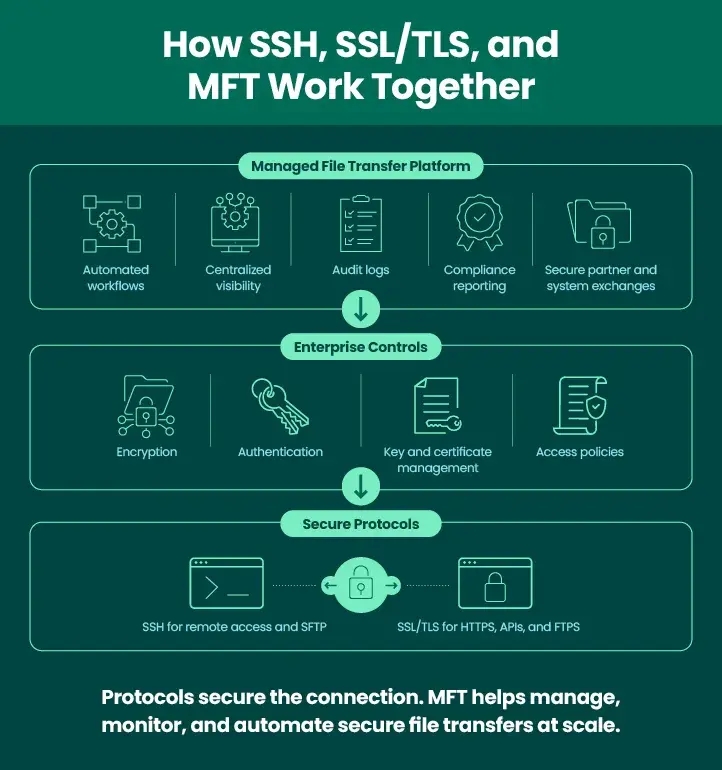
Combining Protocols with Managed File Transfer (MFT)
MFT enhances security by using robust encryption, secure protocols, and granular access controls, while boosting efficiency through automated, centralized, and auditable workflows. It replaces manual, unsecure methods with automated, high-visibility processes, lowering risk of human error, and guaranteeing regulatory compliance. MFT is a layer above protocols and certificates for secure managed file transfers. It combines SSH, TLS, and other protocols into one platform. MFT also provides secure encryption for data at rest and in transit, while offering advanced threat protection.
Final Thoughts: SSH vs SSL
SSH and TLS serve different but complementary purposes. Neither is more secure than the other. Enterprises should focus on centralized management and secure implementation of security tools, protocols, and methodologies.
Try GoAnywhere’s Secure Protocols for Yourself
GoAnywhere MFT helps organizations automatically and securely exchange data with trading partners, employees, and between systems. We can help you confidently transfer sensitive data, meet compliance requirements, automate to help reduce human error risks, and add efficiency to all processes.