Most file transfer proofs of concept begin with straightforward requirements. A few trading partners, a handful of workflows, and a limited number of endpoints can make almost any Managed File Transfer (MFT) solution appear capable.
Evaluations commonly focus on technical capabilities such as SFTP support, encryption, scheduling, cloud connectivity, APIs, high availability, and audit logging. Those features are important, but they do not show how easily the platform can be operated as requirements grow.
A transfer that begins as a simple "move file A from here to there" requirement rarely stays that way. Over time, trading partners update requirements, certificates expire, applications move to the cloud, and security policies evolve. Auditors may request additional evidence, while new business units, acquisitions, and initiatives introduce new workflows and infrastructure.
A useful proof of concept should test more than whether a file reaches its destination. Most MFT evaluations answer the question, “Can the platform move a file?”? A more revealing question is, “What will it cost to operate this process two years from now?”
Looking Beyond Moving Files
Operational debt builds through custom scripts, manual processes, disconnected tools, undocumented dependencies, and monitoring workarounds that accumulate over time.
A scripted SFTP process may look simple when it involves one source, one destination, and a single workflow. As the process evolves, credential updates, workflow modifications, compliance requirements, troubleshooting, and business changes can increase the effort required to maintain it.
Many enterprise MFT platforms address these challenges by bringing automation, security controls, monitoring, auditing, and administration together. GoAnywhere MFT is one example, combining file transfer, automation, and workflow management so teams can manage more of the process without relying on separate scripts and tools.
The evaluation should reveal where each process will live, how it will be maintained, and what outside dependencies it will introduce. The following five questions can help.
Question #1: How Much Business Logic Lives Outside the Platform?
A typical workflow may involve receiving a file, validating it, decrypting it, renaming it, querying a database, transforming data, distributing output files, archiving records, and notifying operations teams if something fails.
During the POC, determine how much of that process the MFT platform can handle before external scripting, middleware or manual intervention becomes necessary.
GoAnywhere can manage file movement, processing, security, notifications, and integrations within a single workflow environment. Administrators can build multi-step workflows that incorporate business logic, error handling, notifications, logging, and reusable components. These capabilities can help teams address new requirements without creating another standalone script to maintain.
The value of automation is not simply that transfers run automatically. Effective automation reduces the number of business processes that depend on manual intervention and institutional knowledge.
A successful transfer proves connectivity. It doesn't prove operability. Test whether administrators can modify, troubleshoot, and scale the workflow without rebuilding it or tracing dependencies across several systems.
Question #2: How Well Does the Platform Handle Exceptions?
Most product demonstrations focus on successful outcomes. In actual production environments, however, workflows inevitably encounter issues such as expired credentials, delayed files, API timeouts, malformed data, connectivity interruptions, or storage limitations.
Rather than attempting to recreate every possible failure scenario yourself, focus on understanding how the platform manages exceptions when they occur. Some organizations may choose to validate a few high-priority scenarios during a POC, while others may ask the vendor to demonstrate how common failures are identified, diagnosed, and resolved.
Key questions to consider include:
- Can administrators quickly identify where a workflow failed?
- Is it easy to see which steps completed successfully before the issue occurred?
- Does the platform provide enough information to support troubleshooting and root-cause analysis?
- Can the right stakeholders be notified automatically?
- How efficiently can administrators restart, recover, or rerun processes without extensive manual effort?
GoAnywhere provides automated-recover capabilities, extensive auditing, workflow histories, monitoring, and notification capabilities that help administrators understand what happened, where it happened, and which step requires attention. This makes it easier to investigate and recover from exceptions without piecing together information from multiple tools.
Question #3: Are You Evaluating Workflow Orchestration or Just Protocol Support?
Protocol support determines where a platform can connect. Workflow orchestration determines how much of the overall business process it can manage once those connections are established.
Most file-transfer initiatives involve more than moving a file from one location to another. Data may originate in an ERP system, require validation or transformation, be encrypted, delivered to a partner, stored in the cloud, and recorded for compliance or audit purposes.
Because of that, it can be helpful to evaluate not only whether a platform supports the required protocols, but also how it coordinates the broader process surrounding those transfers.
Rather than building an extensive end-to-end test for every integration, start by asking questions that reveal how the platform handles real-world workflows:
- How are processes designed and maintained?
- What security controls can be applied throughout the workflow?
- How are notifications, exceptions, and audit requirements managed?
- Can workflows be reused and adapted as business needs change?
- How many supporting tools or custom scripts are required to complete the process?
Depending on your priorities, some of these capabilities may warrant hands-on validation, while others can often be assessed through a vendor demonstration focused on administration, monitoring, and lifecycle management.
GoAnywhere combines protocol connectivity with workflow capabilities such as conditional logic, error handling, variables, notifications, and reusable connections. This enables organizations to manage more of the end-to-end process within a single workflow environment rather than relying on multiple scripts, tools, or integration layers.
When evaluating solutions, consider how many systems can participate in a single governed workflow without requiring additional middleware or custom development. Also examine how integrations are configured, monitored, reused, and maintained over time. A lengthy connector list can be valuable, but long-term operational efficiency often depends on how easily those connections can be governed and managed.
Some customers have described GoAnywhere as a platform that helped consolidate multiple tools into a single environment. While results vary by organization, consolidation can be a useful lens for evaluating whether an MFT solution reduces operational complexity or simply introduces another system that must be managed.
Read More: What Market Leadership Can Tell You About an MFT Solution
Question #4: Can You Reconstruct Activity Months Later?
Security discussions often start with encryption but compliance and audit requirements usually extend much further.
Organizations may need to answer questions such as:
- Who initiated the transfer?
- Which account accessed the file?
- When did the workflow execute?
- Which processing steps occurred?
- Where was the data delivered?
- What security controls were applied?
- Were configuration changes made?
Answering those questions can be difficult when information is distributed across multiple systems.
GoAnywhere brings transfer activity, auditing, permissions, and logging together, making it easier to trace who initiated a transfer, which workflow executed, what actions occurred, and which controls were applied. The easier it is to answer those questions from a unified audit trail, the less time teams need to spend manually gathering evidence during audits and investigations.
During the POC, ask the vendor to reconstruct a completed workflow from the available records. The team should be able to identify who initiated it, which steps ran, what actions occurred, and which controls were applied without assembling evidence from several disconnected systems.
Question #5: What Happens as the Environment Grows?
New partners, applications, cloud services, regulatory requirements, business units, and transfer volumes all contribute to growth. Workflows that begin as temporary processes can become critical business operations.
As environments expand, the challenge is not simply handling more transfers. It is maintaining governance, visibility, and clear administrative boundaries as more teams depend on the platform.
GoAnywhere's active-active clustering, single-console administration, and Security Domains help organizations support growth without deploying separate MFT environments for every team or business unit.
Security Domains allow organizations to segregate users, workflows, and administrative responsibilities while maintaining centralized oversight. This can become increasingly important as additional departments, partners, and regulatory requirements are introduced.
During the POC, ask vendors to demonstrate how they would:
- Add a new business unit
- Assign separate administrative responsibilities
- Isolate users and workflows where required
- Apply appropriate security controls and permissions
- Maintain visibility across the environment
These exercises often reveal more about long-term governance and operational scalability than a throughput test alone.
What Customer Feedback Can Reveal During Evaluation
Customer reviews won’t tell you which product is right for your environment. They can, however, reveal which capabilities matter most after deployment.
Look for recurring comments about automation, administrative effort, visibility, workflow functionality, security, integrations, and support. Repeated strengths can identify capabilities worth testing, while recurring tradeoffs can surface questions to raise during the POC.
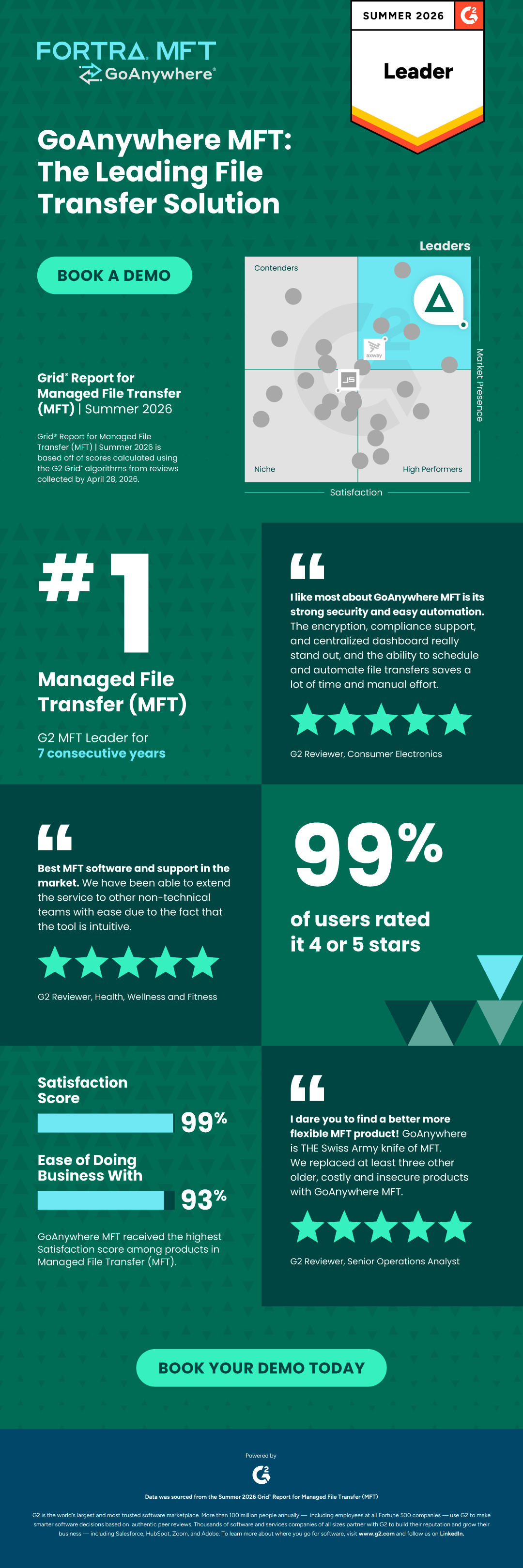
In G2’s Summer 2026 MFT report, GoAnywhere received the highest Satisfaction score among products in the category. This supporting infographic reports 99% Satisfaction and 93% Ease of Doing Business With. (G2 states that the underlying report scores were calculated from reviews collected through April 28, 2026.)
GoAnywhere has also earned recognition by G2 as a Leader for seven consecutive years, reflecting G2’s combination of Satisfaction and Market Presence criteria.
Customer-feedback signals to examine include:
- Automation and workflow capabilities: Buyers looking to retire manual processes and scripts should test workflow depth, maintainability, and error handling.
- Secure transfer, governance, and visibility: Determine whether the platform brings security controls, auditing, monitoring, and workflow administration together in a way that reduces effort.
- Recurring automation across systems: This can indicate that customers use the platform as operational infrastructure rather than only as an SFTP endpoint.
- Learning curve and administration: Identify what expertise, configuration, and ongoing management the platform requires.
Buyers should challenge vendors to demonstrate how claimed benefits are achieved. “Centralized management”, “automation,” and ”visibility” appear throughout the MFT market.
Translate those claims into specific POC tasks:
- Can workflows incorporate conditional logic and error recovery?
- Can activity be audited from a single interface?
- Can administrators scale operations without introducing more custom scripting?
When a Simpler File Transfer Solution May Be Enough
Not every organization requires enterprise-grade MFT capabilities. Enterprise functionality may require more configuration and governance than a basic transfer utility. Evaluate whether that effort replaces greater ongoing work across scripts, tools, and manual processes.
If your environment consists of a small number of transfers, limited workflow requirements, minimal compliance obligations, and relatively simple integrations, a lightweight solution may be sufficient. In that situation, advanced orchestration, extensive governance controls, clustering, or broad integration capabilities may add cost and administrative work without delivering corresponding value.
However, organizations managing large numbers of workflows, partner connections, compliance requirements, cloud services, and business-critical processes may benefit from enterprise MFT, like GoAnywhere, that reduce the number of scripts, tools, and manual processes surrounding file transfer.
The POC should help determine which category your organization falls into rather than assume that more functionality is always better.
Make the POC Reflect Real Operations
Build the POC around a representative production workflow, not an isolated transfer. Include the automation, security controls, integrations, alerts, monitoring, reporting, and exception handling the process will require in practice.
For example, test a workflow that:
- Retrieves data from a real source type
- Validates or transforms the data
- Applies encryption or another required security control
- Delivers the file to its intended destination
- Records the activity for audit purposes
- Notifies the appropriate team
- Handles a deliberately introduced failure.
As the workflow runs, evaluate:
- How much custom code or scripting is required?
- How easy is troubleshooting?
- Can workflows be modified without significant effort?
- Will the same approach scale across additional use cases?
- Can connections and components be reused?
- Can an administrator who did not build the workflow understand and maintain it?
- Can the same approach support additional partners, systems, and business units?
- Can the team retrieve a complete audit trail later?
The goal is not to make the POC unnecessarily difficult. It is to expose the work that a simple connectivity test leaves hidden.
Test Operability, Not Just Connectivity
Most enterprise MFT platforms can complete a successful transfer under controlled conditions. A stronger POC shows what happens when requirements change, integrations multiply, failures occur, evidence is requested, and more teams depend on the environment.
A successful transfer proves connectivity. A successful POC demonstrates operability.
See How Customers Evaluate Leading MFT Solutions
Explore how verified users evaluate GoAnywhere and other leading MFT platforms across usability, business value, security, automation, and day-to-day administration.