What is AS2?
AS2 (Applicability Statement 2) is a secure B2B file transfer protocol specification for transporting critical business data securely and reliably over the internet.
Upgraded from the original protocol (AS1) that was created in the 1990s, the AS2 protocol supports the encryption of messages (also known as AS2 messages) that are then exchanged with trading partners and vendors via HTTPS. These messages are built using the S/MIME format.
How Does the AS2 Protocol Work?
AS2 utilizes digital certificates and encryption standards to protect critical information while it’s in transit across systems, networks, and locations. AS2 digital document messages can be compressed, signed, encrypted, and sent over HTTPS using TLS.
Users can also request an MDN (known as Message Disposition Notification; also, sometimes referred to as "receipt") alert to verify that the message was received and decrypted successfully. Using signed receipts to compare the returned message checksum value creates a non-repudiation of receipt (NRR). An NRR gives the sender legal proof of unaltered delivery. This process gives organizations stronger evidence of delivery and helps reduce disputes with trading partners.
MDNs can be delivered in a variety of ways, including:
Synchronous MDN

This option allows the AS2 server connection to remain open until an MDN is received, or a timeout occurs.
Asynchronous MDN

This option allows the AS2 server connection to close immediately after the initial transmission is completed. When the server processes the AS2 message, the server will open a new connection and send the MDN.
Email MDN

This option allows the AS2 server to return an MDN to the sender via email.
AS2 Connections
The AS2 connection helps ease and secure the exchange of data between trading partners.
The messages sent via AS2 are sent over an HTTPS/TLS connection, making AS2 a very secure option for transferring files. In addition, with MDNs, AS2 helps ensure messages are delivered as intended. The AS2 protocol also helps meet compliance requirements as it uses signed receipts and compares them to the returned message checksum value for a non-repudiation of receipt (NRR). This is considered legal proof of delivery.
GoAnywhere supports AS2 connections through:
- Enforcing strong end-to-end encryption: GoAnywhere automatically encrypts messages and applies a digital signature via private key.
- Secure transmission: AS2 messages are sent securely over an SSL tunnel.
- Automated message processing: With GoAnywhere, once a file is received, Advanced Workflows can continue processing the message as determined by the admin.
- Error handling: MFT can ensure you know about any message fails before your recipient can auto-retry and send other alerts according to rules set by the admin.
- Receipt confirmation: MFT returns an MDN to confirm receipt of messages (whether successful, or if transmission failed)
- Centralized trading partner management: Users can configure, monitor, and manage AS2 partner profiles from the same interface.
- Compliance-ready logging: The system enables capturing AS2 transaction history, MDNs, timestamps, and processing details to support audits.
- Workflow integration: You can automatically route, translate, archive, or process AS2 messages after receipt.
Why Use AS2?
Using the AS2 protocol comes with unique advantages that ensure the streamlining of critical data exchange. These advantages include end-to-end encryption, strong authentication of senders and recipients through the use of digital signatures, and validation of file integrity with successful transfer confirmation.
AS2 is a secure industry standard protocol for sending sensitive data. Organizations using AS2 often choose it over other file transfer protocols (like FTP or SFTP) because of how it can support their compliance efforts by providing encryption, authentication, receipt confirmation, and auditable transaction records.
Benefits of AS2 & AS2 software
End-to-end encryption for sensitive files
Authenticating senders and recipients with digital signatures
Validation of file integrity with successful transfer confirmation
Ability to send/retrieve file transfers of any size or volume
Flexible support for synchronous or asynchronous MDN receipts
FTP vs AS2
Both FTP and AS2 are popular file transfer protocols and can serve organizations in distinct ways. Choosing which one is best for your business needs will depend on what level of security your data requires. First, let’s look at FTP.
What is FTP?
File Transfer Protocol, or FTP, is the original standard network protocol used to transfer sensitive data between a client and a server on a network. It’s been around since the 1970s and is a common and simple method to transfer files for many organizations.
The FTP protocol works over a TCP/IP-based network using a client-server model and relies on two separate channels. The command (control) channel typically operates over TCP port 21, while the data channel uses different ports depending on whether the FTP connection is configured in active or passive mode. While FTP remains widely used for file transfers, it transmits data and credentials in plaintext, making it unsuitable for organizations that require secure data exchange and regulatory compliance.
Security Concerns of FTP
Authentication with FTP is via a username and password. However, access may also be possible without a login if the FTP server is configured to allow anonymous access. In addition, data is transmitted in plain text, which is susceptible to attacks and interception (this includes log in credentials such as passwords and usernames).
For these reasons, using more secure protocols such as AS2, FTPS, and SFTP is recommended when transferring sensitive data and to protect authentication. FTP may still be useful within some low-risk legacy workflows, but it should not be used for sensitive or regulated data without additional safeguards.
How FTP Differs from AS2
Authentication:
- FTP sends user credentials such as usernames and passwords as plain text and does not encrypt files within the transfer window.
- AS2 authenticates with digital certificates for a higher level of security.
Encryption
- FTP operates over its own set of ports, supporting both active and passive modes
- AS2 leverages the security features of HTTP/HTTPS.
Message receipts/non-repudiation:
- AS2 allows users to request a Message Disposition Notification (MDN), or receipt which can alert the sender that the message was received and decrypted by the intended recipient. This can serve as legal proof that the file sent was received without alteration.
- FTP does not have MDN capabilities.
Digital Signatures:
- AS2 provides digital signatures to help ensure data integrity and authenticity.
- FTP does not use digital signatures.
Communication channels:
- FTP channels are unencrypted, leaving data open and vulnerable to interception.
- AS2 channels are encrypted to keep sensitive data protected.
Compliance:
- FTP lacks encryption functionality so cannot meet compliance requirements.
- AS2 uses encryption such as AS2, which many regulatory bodies require. In addition, as AS2 can deliver acknowledgements and receipts, it helps satisfy auditing and tracking requirements.
Automation:
- GoAnywhere MFT can execute the same automation tasks for both FTP and AS2, as well as for other protocols. Automation can be used for tasks such as monitoring for new files then sending them automatically with the chosen protocol.
In general, while FTP may have been around for a long time and is a simple protocol to use, the more secure options of FTPS and SFTP as well as AS2 offer more protection to sensitive data.
Improve Your File Transfers with GoAnywhere's AS2 Protocol Solution
Request an AS2 Software Trial
AS2 Client Software & Server
AS2 Client
The AS2 client software in GoAnywhere can automate the delivery of AS2 messages or send AS2 messages on a scheduled basis. It can automatically reconnect to the server if a connection breaks and retransmit the message. Both synchronous and asynchronous receipts can be logged to ensure AS2 messages were successfully processed by the trading partners. This means teams can scale outbound partner communications without relying on custom scripts or manual follow-up.
AS2 Server
The AS2 server software in GoAnywhere allows you to receive AS2 messages. Your trading partners can be authenticated using a combination of user credentials and X.509 certificates. This creates a controlled inbound exchange process for customers, suppliers, vendors, and trading partners. When a message is received, you can have a trigger automatically process the received files. For instance, GoAnywhere could move the AS2 documents to another area on the network or call an application to process these files.
Simplified Administration
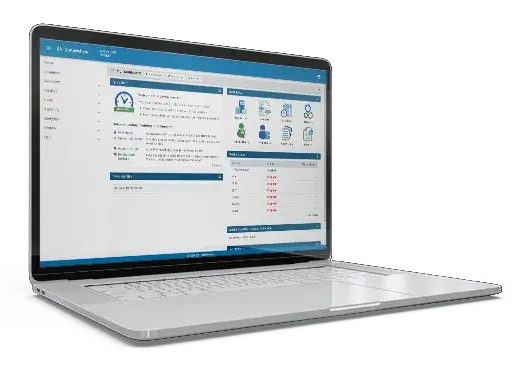
GoAnywhere MFT provides a browser-based interface for configuring and monitoring AS2, AS3, and AS4 protocol file transfers and workflows. Each administrator can be assigned different permissions in GoAnywhere with their own custom dashboards.
- Configure AS2/AS3/AS4 file transfers and workflows using graphical wizards
- Set up AS2/AS3/AS4 trading partners quickly
- Easily create, import, and export X.509 certificates with AS2/AS3/AS4 certificate exchange
- Receive automatic status alerts on AS2/AS3/AS4 transfers
- View AS2/AS3/AS4 audit logs and analytical information
- Exchange sensitive digital documents with AS2/AS3/AS4 trading partners
- Assign role-based permissions to separate administrative responsibilities
- Monitor partner activity and transfer status from customizable dashboards
AS2 Client Software Features
Fully automates AS2 protocol transfers with an integrated scheduler
Provides graphical wizards to set up AS2 trading partners quickly
Encrypts messages and files using strong AES-256 bit encryption
Guarantees delivery with auto retry and auto-resume
Supports synchronous and asynchronous receipts
Can be scaled to handle unlimited AS2 partners
Generates detailed audit logs of all AS2 transfers
Securely transfers digital document files between businesses
AS2 Certificate
Drummond Certification
Drummond Certified is a label that the Drummond Group (a third-party certification body) gives to products and solutions that have proven their interoperability between AS2 vendors. The certification is extensive and helps ensure that the solution you use will allow you to successfully integrate with your AS2 trading partners. For enterprise teams, certification can mean a reduction in onboarding risk and improved confidence when connecting with new trading partners.
In order to pass the Drummond Certification process, any product attempting certification must conduct thousands of AS2 protocol test scenarios successfully in the Drummond Group's controlled, vendor-neutral environment. This process uses full matrix interoperability testing between AS2 vendor solutions to verify that important transactions maintain their security and integrity as they are transmitted over the Internet.
AS2 Drummond Certified™
GoAnywhere MFT is Drummond-certified for AS2 and meets the standards of Applicability Statement 2 (AS2) as a secure and widely adopted method for exchanging electronic documents with trading partners. This helps organizations meet partner requirements while reducing compatibility issues across AS2 ecosystems. Drummond Certification for AS2 helps ensure compliance and compatibility with other AS2 solutions through extensive interoperability testing. GoAnywhere is also certified for SHA-2, Multiple Attachments, Filename Preservation, and Chunked Transfer Encoding with AS2.

Getting Started with AS2 File Transfers
Whether your trading partners require you to send files using AS2 or you’re looking for an industry standard protocol to transmit sensitive files that meet regulatory compliance, it’s easy to implement AS2 in your organization. You just need the right solution.
GoAnywhere MFT is a secure managed file transfer solution that simplifies, streamlines, audits, and automates your file transfers across a variety of environments. It provides AS2 client and AS2 server software for small, medium, and enterprise-level organizations.
AS2 Tutorials
Learn how to transfer AS2 files with GoAnywhere MFT
We were looking for an off-the-shelf implementation of an AS2 Server and Client that we could easily integrate with our systems on AWS [Amazon Web Services.] GoAnywhere was the perfect match.
Executive Sponsor G2 Review
What is AS3?
AS3 (Applicability Statement 3) is a secure message standard for exchanging business files using S/MIME formatting, most often over FTP or FTP/S workflows. It was originally created to transfer structured data files, like XML and EDI documents, for business-to-business data sent over FTP(S). These messages are structured using the standard S/MIME format.
When and Why to Use AS3
AS3 is a secure protocol for sending sensitive data. Organizations using AS3 often choose it over other common file transfer protocols (like FTP or SFTP) because it simplifies the process to meet compliance requirements and trading partner needs.
Users can request MDNs (Message Disposition Notifications), or receipts to verify that the intended AS3 message as received, either as signed or unsigned. However, AS3 is not as commonly used as AS2, which means partner requirements often are the deciding factor in whether it is the right fit.
Benefits of AS3
End-to-end encryption for sensitive files through SSL
Transaction records and audits
Delivery receipts and MDN
Audit records that help track partner exchanges
Support for signed or unsigned MDN receipts
Secure handling of structured business documents
What is the Difference Between AS2 and AS3?
While AS2 is a transfer protocol, AS3 is a message standard that focuses on message formatting. Where the AS2 protocol requires a dedicated AS2 server and client to send messages, AS3 is flexible: once an AS3 message is composed, it can be transmitted via any other protocol – FTP, SFTP, HTTPS, and more – as long as both the sender and recipient can access the message’s location. Also unlike AS2, AS3 is a push-pull protocol and does not require an ongoing connection. In most organizations, AS2 is the preferred protocol. AS3 typically is used when a partner or workflow specifically requires it.
The AS3 Client
The AS3 client software in GoAnywhere can automate the delivery of your AS3 messages, send on a schedule, or send based on triggers. With GoAnywhere, you can:
- Attach multiple files to a message
- Digitally sign all outgoing messages
- Receive message receipts either automatically or manually
- Log all AS3 message traffic – what was sent, by who, and date and time
- Automate AS3 sends based on schedules, file events, or workflow triggers
- Integrate AS3 exchange into larger file processing workflows
What is AS4?
AS4 is a secure B2B messaging protocol based on web services and SOAP that supports encrypted, reliable exchange of business documents between partners. It builds on the foundations set by AS2 to improve security, reliability, and flexibility for delivering and receiving messages. As a Business-to-Business standard, AS4 makes exchanging documents over the internet simple and secure. It’s often used whenever organizations need standardized, reliable messaging that aligns with modern web services environments.
How Does AS4 Work?
AS4 is payload agnostic and can also send multiple payloads in one AS4 message. Unlike AS2, AS4 is based on SOAP and Web Services, which many organizations use, making it more compatible with standard environments. It can support multiple payloads, metadata, receipts, and reliable messaging requirements in one exchange. Because it is payload-agnostic, AS4 is not limited to any single specific document type.
Why Use AS4?
AS4 is a secure B2B and B2C method for exchanging data. It supports encryption, reliable delivery, and large file transfers for secure business document exchange.
Benefits of AS4
Messages sent via AS4 cannot be modified in transit without the change being detected
Non-repudiation means that both the sender and the recipient receive records of the data movement
Reliable delivery includes confirmations and ensures a one-time delivery. If a message fails, AS4 will re-send
What’s the Difference Between AS2 and AS4?
AS2 is HTTPS-based, is widely adopted for digital document exchange, and offers strong functionalities for established trading partner ecosystems. AS4, on the other hand, is SOAP/web-services-based, supports reliable messaging, and is useful for modern B2B integration frameworks.
What's the Difference Between AS3 and AS4?
Although both AS3 and AS4 support secure B2B data exchange, they use different technical models and therefore fit into different partner requirements. Discover the history of these two protocols, and how they work to improve file transfers in different ways.
The AS4 Client
The AS4 client software in GoAnywhere can automate your workflows and improve your file transfers. Compress, sign, and encrypt your messages to ensure utmost security, and monitor your data transfers easily with receipts for messages sent and received, as well as with logging.
Related Reading: AS2, AS3, and AS4



Secure Your File Movement with GoAnywhere
Start a free 30-day trial and see if GoAnywhere is the right solution for your organization.