
As organizations continue expanding their use of cloud computing, enterprise IT teams are managing increasingly complex environments. Modern businesses often operate across multiple cloud platforms,
hybrid infrastructures, Software as a Service (SaaS) applications, and on-premises systems, all of which generate and exchange critical business data every day. As these cloud environments grow, manual processes become more difficult to maintain and more likely to introduce delays or inconsistencies.
Cloud automation addresses these challenges by replacing repetitive manual work with standardized, automated workflows. Organizations can move files securely, synchronize systems, monitor business processes, and manage cloud resources with greater consistency while reducing administrative effort.
The result is improved operational performance and stronger governance across the enterprise.
This article explores the primary cloud automation benefits for enterprise data workflows. You’ll learn how automation improves efficiency, strengthens cloud security, supports compliance initiatives, enhances visibility, increases scalability, reduces cloud costs, and improves reliability for business-critical file transfers. You’ll also see how Fortra’s GoAnywhere MFT helps organizations automate secure data movement across cloud and hybrid environments.
What Is Cloud Automation?
Cloud automation is the use of technology to automatically manage cloud-based tasks, workflows, and resources with minimal manual intervention. Instead of requiring administrators to perform recurring activities individually, organizations configure automated processes that execute consistently whenever defined conditions are met.
A cloud automation tool can automate a wide variety of enterprise operations. Common examples include moving files between cloud storage services, synchronizing information between a cloud platform and internal systems, triggering workflows when new files arrive, scheduling recurring transfers, managing cloud infrastructure automation tasks, and sending alerts whenever a workflow encounters an exception.
Many organizations also use cloud automation software to support cloud orchestration, allowing multiple systems and processes to work together as part of a larger business workflow. By reducing manual involvement in repetitive or high-volume tasks, automation enables IT teams to spend less time managing routine operations and more time improving business services.
Why Cloud Automation Matters for Modern Enterprises
Today’s enterprises depend on distributed applications, hybrid cloud infrastructure, SaaS platforms, remote employees, and growing partner ecosystems. As digital transformation initiatives expand, managing every workflow manually becomes increasingly difficult. Cloud automation helps standardize processes across cloud applications, storage platforms, internal systems, business partners, and remote users. Standardized workflows reduce operational complexity while supporting consistent execution throughout the organization.
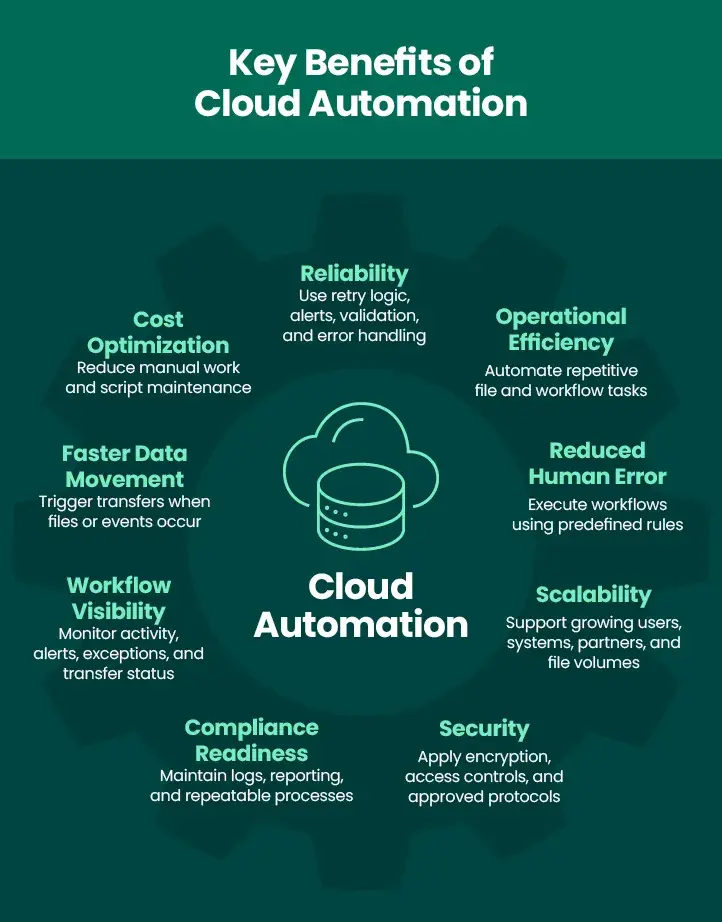
For enterprise IT teams, this translates into faster workflows, improved productivity, stronger governance, better scalability, and reduced operational risk. Instead of relying on disconnected scripts or manual intervention, organizations can implement repeatable processes that support changing business requirements while maintaining control across the entire cloud environment.
1. Improved Operational Efficiency
One of the most significant key benefits of cloud automation is improved operational efficiency. Routine administrative work often consumes valuable IT resources. Teams may spend hours moving files, monitoring folders, sending notifications, verifying successful transfers, or troubleshooting routine workflow issues. Automating these activities reduces administrative effort while improving execution speed.
An organization can automatically move financial reports from a cloud application into an internal reporting system every morning without requiring staff involvement. Automated workflows also monitor designated folders, launch transfers when files arrive, and notify stakeholders once processing is complete.
GoAnywhere MFT supports these capabilities through automated file transfers, scheduled workflows, folder monitoring, and Cloud Connectors that integrate with popular cloud services. As repetitive work is automated, IT professionals can focus on projects that improve business performance instead of maintaining recurring processes.
2. Reduced Human Error
Manual file handling introduces opportunities for mistakes that may disrupt business operations or create security risks. Files may reach the wrong destination. Scheduled transfers can be overlooked. Older document versions sometimes replace current files, while required security procedures or stakeholder notifications may be skipped during busy periods.
Cloud automation improves consistency because workflows execute according to predefined rules. Each process can automatically encrypt files, transfer data using approved methods, validate successful completion, record activity for auditing, send notifications when appropriate, and archive completed transactions according to organizational policies. This consistent execution reduces enterprise risk while supporting reliable business workflows throughout the organization.
3. Better Scalability Across Cloud and Hybrid Environments
Growth creates additional complexity for enterprise IT. As organizations add users, business applications, trading partners, and multiple cloud services such as Google Cloud, manual processes require increasing amounts of administrative effort. Expanding workflows without automation often results in additional staffing requirements or complicated custom scripting.
Cloud automation enables organizations to scale operations without adding proportional manual work. Automated workflows support cloud-to-cloud transfers, cloud-to-on-premises integrations, and hybrid deployment models while maintaining consistent execution. Organizations can manage increasing file volumes, support more frequent business exchanges, integrate additional applications, and onboard new partners without redesigning every workflow.
GoAnywhere MFT and GoAnywhere MFTaaS support cloud, SaaS, on-premises, and hybrid deployment strategies, giving organizations flexibility as their infrastructure evolves.
4. Stronger Security and Access Control
Protecting sensitive information remains one of the primary priorities for enterprise IT. Cloud security automation allows organizations to enforce security controls automatically instead of relying on users to remember every required step. Automated workflows can encrypt files before transmission, require approved secure protocols, apply role-based access controls, enforce workflow policies, and generate alerts whenever failures or unusual activity occur. Consistent security processes also help reduce shadow IT by encouraging employees to use approved enterprise workflows rather than consumer file-sharing services.
GoAnywhere MFT strengthens cloud security through secure file transfer protocols, integrated encryption, role-based permissions, centralized audit logging, and managed file transfer workflows that help organizations protect sensitive business information throughout the transfer process.
5. Improved Compliance and Audit Readiness
Many industries operate under regulations that require organizations to protect sensitive information while demonstrating appropriate operational controls. Cloud automation supports compliance efforts by creating repeatable workflows and maintaining comprehensive audit trails. Automated processes can record who initiated a transfer, when files moved, whether transfers completed successfully, and which security controls were applied during processing. These detailed records help organizations prepare for internal reviews and external audits while supporting governance initiatives.
Depending on implementation and organizational policies, automated workflows may support compliance efforts for regulations and frameworks including Health Insurance Portability and Accountability Act (HIPAA), Payment Card Industry Data Security Standard (PCI DSS), General Data Protection Regulation (GDPR), Sarbanes-Oxley Act (SOX), and similar industry requirements. While automation strengthens compliance programs, organizations remain responsible for configuring processes appropriately and maintaining overall governance.
6. Greater Visibility into Cloud Workflows
Enterprise IT teams require clear visibility into business-critical workflows to maintain operational performance. Manual processes often rely on disconnected logs or individual users to report problems, making issues more difficult to identify before they affect business operations.
Modern cloud automation software provides centralized dashboards, reporting capabilities, alerts, and detailed workflow logs. Administrators can monitor workflow status, review transfer success or failure, investigate delays, track user activity, and respond quickly to exceptions. Improved visibility supports faster troubleshooting while strengthening governance, service-level agreement management, operational planning, and ongoing process optimization across the enterprise.
7. Faster Data Movement and Business Processes
Business decisions depend on timely access to information. Cloud automation accelerates enterprise workflows by moving files immediately when triggering events occur rather than waiting for scheduled manual uploads or downloads. Inventory updates can be delivered directly to suppliers after processing completes. Financial reports can move into internal reporting systems without delay.
Customer information may synchronize across business applications as new records become available. Healthcare organizations can securely transfer approved files to authorized destinations according to established workflows. Faster data movement supports quicker decision-making, improves collaboration with partners, reduces workflow bottlenecks, and enhances customer experiences by ensuring critical information reaches the right systems at the appropriate time.
8. Cost Savings and Better Resource Allocation
Organizations continually evaluate ways to improve operational efficiency while controlling expenses.
Cloud automation reduces labor associated with repetitive administrative work while lowering costs related
to failed transfers, manual errors, missed deadlines, and ongoing maintenance of custom scripts. Automated monitoring also reduces the need for administrators to supervise recurring workflows throughout the day.
As repetitive tasks become automated, IT professionals can devote more time to strategic initiatives that improve business performance. When evaluating total cost of ownership, organizations should compare manual processes, internally developed scripts, disconnected point solutions, and centralized automation tools that provide integrated management, reporting, security, and workflow automation within a single platform.
9. Improved Reliability and Business Continuity
Reliable data movement is essential for business-critical operations. Cloud automation strengthens workflow reliability by incorporating retry logic, automated alerts, resume capabilities for interrupted transfers, structured error handling, and file validation before processing continues. These capabilities reduce disruptions caused by temporary network outages, system maintenance, or transfer failures while helping organizations meet operational expectations.
Reliable automated workflows are particularly valuable for time-sensitive business processes involving customers, suppliers, financial operations, healthcare data, or regulatory reporting. Consistent execution supports business continuity while helping organizations meet service-level commitments.
Cloud Automation vs. Traditional Manual Processes
Manual processes may be manageable for organizations with relatively simple workflows, but they become increasingly difficult as file volumes grow and business systems expand. Every additional application, trading partner, or cloud service creates another opportunity for delays, inconsistent execution, or administrative overhead. Cloud automation replaces repetitive human effort with standardized workflows that execute according to predefined rules.
| Area | Manual Cloud Processes | Cloud Automation |
| Speed | Dependent on user action | Runs on schedules or triggers |
| Consistency | Varies by user | Executes repeatable workflows |
| Security | Can be inconsistent | Applies approved control automatically |
| Visibility | Often limited | Tracks activity through logs and alerts |
| Scalability | Harder as volume grows | Supports high-volume workflows |
| Compliance Support | Manual evidence gathering | Centralized logs and reporting |
Move Toward Smarter Cloud Automation
The business value of cloud automation continues to grow as organizations expand their digital operations. Automating repeatable workflows improves efficiency, strengthens security, supports scalability, enhances visibility, and increases reliability across enterprise data exchanges.
Organizations experiencing challenges with manual workflows, custom scripts, disconnected systems, or growing cloud complexity should evaluate enterprise automation tools that centralize workflow management while supporting secure data movement. As cloud infrastructure continues evolving, investing in a comprehensive cloud automation tool helps organizations simplify operations, improve governance, optimize cloud resources, and reduce long-term cloud costs while supporting secure enterprise data workflows.
GoAnywhere MFT helps organizations automate, secure, and monitor file-based workflows across cloud and hybrid environments. Its managed file transfer capabilities support secure cloud file movement, centralized workflow management, strong security controls, and enterprise-scale data exchange between internal systems, cloud services, trading partners, and customers.