What are SFTP Servers?
An SFTP server securely receives and manages files transferred through SSH File Transfer Protocol. Unlike standard FTP, SFTP encrypts authentication credentials, commands, and file data while they move between the client and server.
The Secure File Transfer Protocol (SFTP) protects data in transit. Files stored on the server are only encrypted at rest if the server, storage environment, or additional encryption tools provide that protection.
Enterprise SFTP solutions may also support or integrate with encryption at rest for stored files. SFTP typically uses a single encrypted connection, which can simplify firewall management compared with protocols that require separate command and data channels.
Related Reading: Are SFTP Files Encrypted?
Related Reading: Are SSH and SFTP the Same?
What Is SFTP?
SFTP, or SSH File Transfer Protocol, is a secure protocol for transferring and managing files over an encrypted SSH connection. SFTP can authenticate users with passwords, SSH keys, or a combination of approved methods.
This additional layer of protection makes for a more secure process that can help reduce unauthorized access risk and improve control over recurring file transfer workflows. Despite the similar name, SFTP is not simply FTP with added security. SFTP is a separate protocol built on SSH.
Related Reading: How SFTP Works
How Does an SFTP Server Work?
An SFTP server enables secure file transfer by using SFTP. Unlike traditional FTP, SFTP operates over SSH, which encrypts every SSH connection to protect sensitive data during transmission. This combination of strong authentication and SSH encryption makes SFTP a trusted solution for organizations that need secure, reliable data transfer.
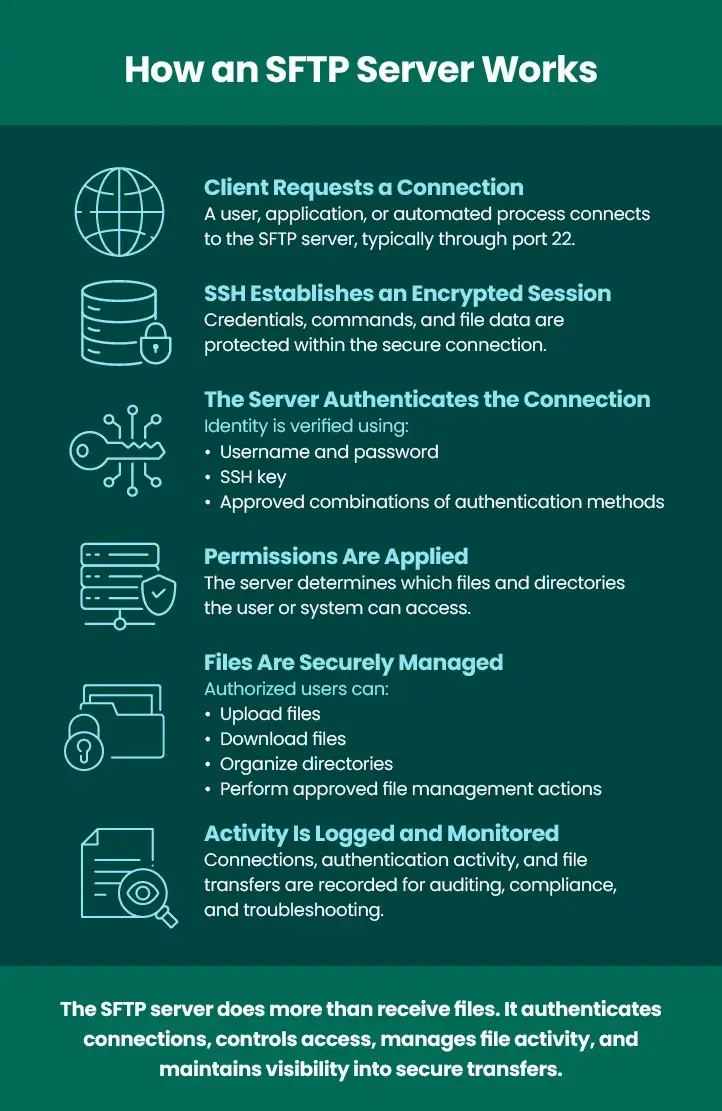
The process starts when an SFTP client initiates a connection to the server. In most environments, the SFTP protocol uses port 22 because it runs over the SSH protocol, although administrators can configure a different port to meet their organization’s security or networking requirements. Before any files are exchanged, the SSH server establishes an encrypted session. This secure channel protects all communications between the client and server, helping prevent interception or unauthorized access.
Once the encrypted session is established, the user or system must authenticate before accessing the server. Authentication can be performed using a username and password, an SSH key, or both for additional security.
After successful authentication, the server applies configured permissions to determine which files and directories the user can access. These permissions ensure users can only view, upload, download, or modify approved directories based on their assigned access rights. After authentication and authorization, users can begin transferring files.
SFTP Workflow
- An SFTP client connects to the SFTP server.
- Secure Shell (SSH) establishes an encrypted session.
- The user or system authenticates using credentials or an SSH key.
- The server applies configured permissions and grants access to approved directories.
- Files are uploaded, downloaded, or managed using the SFTP command set and standard file management operations.
- Transfer activity is logged and monitored for auditing, compliance, and troubleshooting.
Since every file transfer occurs within an encrypted SSH session, organizations can securely exchange sensitive data without exposing information over the network. This level of protection makes secure file transfer a preferred choice for industries with strict security and compliance requirements.
In managed file transfer environments, administrators can also monitor activity, automate post-transfer workflows, and apply role-based access policies. These capabilities help organizations streamline operations while maintaining visibility and control over every secure FTP transfer.
SFTP Server vs. SFTP Client
Although they work together, an SFTP server and an SFTP client perform different roles in SFTP. An SFTP
server is responsible for accepting incoming connections, authenticating users, storing or receiving files,
and enforcing access permissions. It acts as the central destination where files are securely exchanged and managed.
An SFTP client, on the other hand, initiates the connection to the server. Once connected, it enables users or automated processes to upload, download, or organize files using the SFTP protocol. Many organizations use client software to automate recurring data transfer tasks between internal systems and external partners.
Most businesses need both server and client capabilities. For example, a company may receive files from suppliers through its own SFTP server while using an SFTP client to send reports, invoices, or other business documents to customers and partners.
Many enterprise managed file transfer platforms support both client and server functionality within a
single solution. This allows organizations to securely send and receive files, automate workflows,
enforce authentication and permission policies, and centralize file management across multiple systems.
Businesses running a Windows Server environment or other enterprise infrastructure can use these
integrated capabilities to simplify administration while maintaining secure, compliant file transfer operations.
| Component | Primary Role |
| SFTP Server | Receives connections and controls file access |
| SFTP Client | Connects to servers to send or retrieve files |
Why Use an SFTP Server?
Organizations use SFTP servers when files need to move securely between users, systems, applications, and external partners. SFTP protects files while they are in transit. Enterprise solutions may also support encryption at rest and additional controls for stored files.
Enterprise SFTP servers help you protect the confidentiality and integrity of your data by:
- Providing access to authorized users only
- Encrypting credentials, commands, and files while they are in transit
- Protecting transfer integrity over the SSH connection
- Supporting audit logs and reporting for security and compliance efforts
- Using a single connection, which can simplify firewall configuration and monitoring
- Supporting SSH key authentication for automated or high-security workflows
- Applying granular permissions to folders, users, and trading partners
- Centralizing visibility into uploads, downloads, and authentication activity
- Enabling secure server-to-server and partner file exchanges
Prevent unauthorized file access by using SFTP servers. Discover how secure FTP works.
What Should You Look for in an Enterprise SFTP Server?
A basic SFTP server may be sufficient for occasional file transfers between a small number of users. However, enterprise organizations typically require much more than secure connectivity. As the number of users, business partners, and automated processes grows, organizations need greater control, visibility, and scalability to manage file transfers efficiently and securely.
An enterprise SFTP server should do more than simply accept connections and transfer files. It should provide centralized administration, strong security controls, comprehensive auditing, and the ability to automate repetitive processes. These capabilities help IT teams reduce manual work while ensuring sensitive business data is protected and compliance requirements are met.
Many organizations address these needs by adopting a managed file transfer (MFT) platform. In addition to supporting SFTP, MFT solutions extend file transfer capabilities with scheduling, workflow automation, notifications, reporting, centralized SSH key management, and support for additional secure transfer protocols. This enables businesses to standardize and automate file exchange across internal systems, cloud applications, and external trading partners.
When evaluating an enterprise SFTP server, look for the following capabilities:
- Secure authentication
- SSH key management
- Role-based permissions
- Detailed audit logs
- High availability
- Scalability
- Alerts and monitoring
- Automation
- Integration with MFT workflows
- Encryption at rest
- Gateway or DMZ architecture
- Partner management
Learn More About Secure File Transfer Protocol (SFTP)
SFTP, FTP, and FTPS all move files, but they differ significantly in security and architecture. SFTP uses SSH, FTPS adds TLS protection to FTP, and standard FTP does not provide native encryption.