When comparing SFTP vs FTPS speed, File Transfer Protocol Secure (FTPS) is not always faster than Secure File Transfer Protocol (SFTP), and SFTP is not always slower. Actual file transfer speeds depend on the network, implementation, encryption settings, file size, file workload, and system resources.
FTPS secures File Transfer Protocol (FTP) with Transport Layer Security (TLS), while SFTP is a separate file transfer protocol that operates over Secure Shell (SSH). FTPS is defined as TLS support for FTP, while OpenSSH describes SFTP operations as running over an encrypted SSH transport.
FTPS vs. SFTP
FTPS and SFTP both support secure file transfer, but they are separate protocols with different architectures, authentication methods, and network requirements. The fastest option depends on the environment, while the best option also depends on security requirements, firewall architecture, trading partner needs, and administrative complexity.
What is FTPS?
FTPS, or FTP over TLS, extends the traditional FTP protocol with TLS-based security for authentication and encrypted communication. FTPS uses a control connection for commands and separate data connections for file transfers. TLS protects the secure session, with data-channel protection configured according to the connection requirements. As file transfers use separate data connections, firewall and port configuration may be more involved than with SFTP.
Organizations may deploy either Explicit FTPS or Implicit FTPS. Explicit FTPS upgrades a standard FTP connection to a secure connection using TLS, while Implicit FTPS requires encryption from the beginning of the session. Both are forms of FTP Secure and remain compatible with environments that rely on the traditional FTP protocol.
Related Reading: FTPS Client
What is SFTP?
SFTP, or SSH File Transfer Protocol, is a separate file transfer protocol that performs file operations over an encrypted SSH transport. Despite the similar acronym, SFTP is not standard FTP with SSH added. Depending on configuration, SFTP users and systems can authenticate with passwords, SSH keys, or approved combinations of authentication methods.”
Related Reading: SFTP Client
FTPS vs. SFTP: Key Differences
FTPS and SFTP are often confused as they both securely transfer files, but they are fundamentally different protocols.
| Factor | FTPS | SFTP |
Full Name | FTP over TLS | SSH File Transfer Protocol |
Security Foundation | TLS | SSH |
Relationship to FTP | Extends FTP | Separate protocol |
Connection Architecture | Control and data connections | Operations over encrypted SSH transport |
Common Authentication | Passwords and certificates | Passwords and SSH keys |
Firewall Configuration | Can require additional data-channel configuration | Often simpler connection management |
Speed | Depends on environment and implementation | Depends on environment and implementation |
Best Fit | Existing FTP/TLS ecosystems and partner requirements | SSH-based automation and secure file exchange |
Which is Faster?
Discussions around SFTP vs FTPS speed often assume one protocol is universally faster, but that is not the case. FTPS may outperform SFTP in some environments, but protocol architecture alone does not determine real-world transfer speed. Depending on the implementation, encryption configuration, network, and workload, the performance difference may be small, significant, or reversed. It is recommended to benchmark both protocols using realistic, real-world files, infrastructure, and network conditions when speed is business critical.
What Affects FTPS and SFTP Transfer Speed?
The transfer speed of FTPS and SFTP depends on much more than the protocol itself. While organizations often compare the two to determine which is faster, real-world performance is influenced by a combination
of network conditions, system resources, software configuration, and the type of files being transferred. As a result, two organizations testing the same protocols may see very different outcomes.
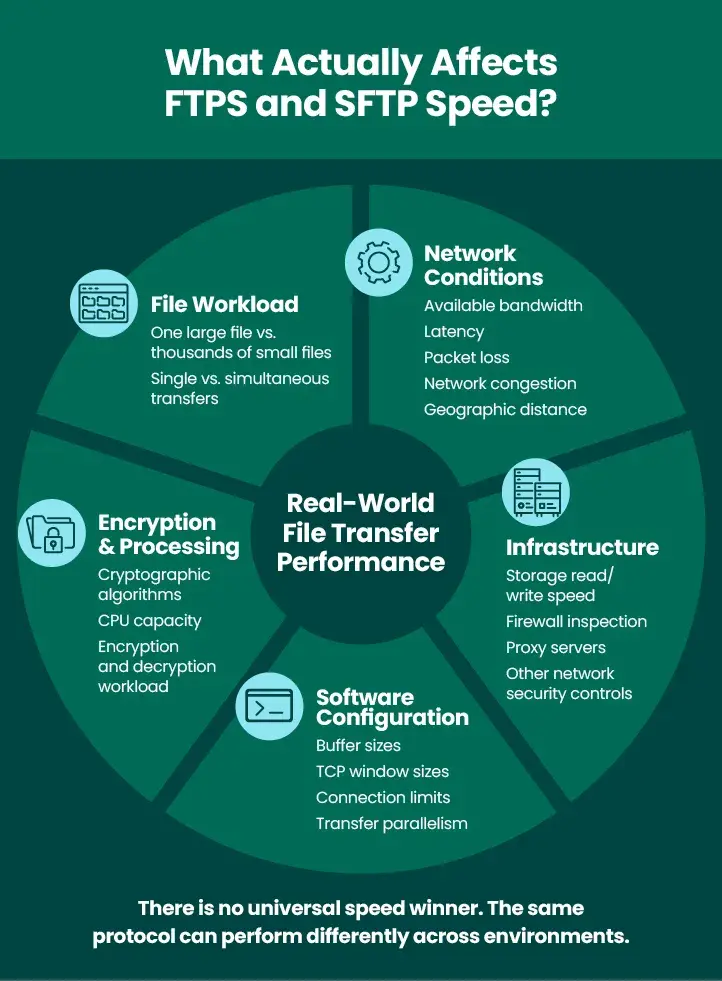
One of the biggest factors is the file workload. A protocol that transfers a single multi-gigabyte file efficiently may not perform as well when handling thousands of small files. Small files require more frequent file operations, metadata exchanges, and acknowledgments, which can increase overhead and reduce overall throughput. Similarly, transferring multiple files simultaneously can produce different results than transferring files one at a time.
Network conditions also play a major role in transfer performance. Available bandwidth determines the maximum amount of data that can be transmitted, while latency, the time it takes data to travel between systems, can significantly affect how quickly files are transferred, especially over long distances. Packet loss, network congestion, and geographic separation between the client and server can all contribute to slower transfer speeds, regardless of whether FTPS or SFTP is used.
As both protocols encrypt data, encryption and system resources are another important consideration. Encrypting and decrypting files requires CPU processing on both the client and server. The cryptographic algorithms selected, the processing power available, and other workloads competing for system resources can all influence overall transfer performance. On systems with limited CPU capacity, encryption overhead may become a bottleneck, particularly during high-volume transfers.
The software configuration of the client and server can also affect performance. Settings such as buffer sizes, TCP window sizes, connection limits, and the level of transfer parallelism can significantly impact throughput. In addition, different FTPS and SFTP software implementations may optimize data transfers differently, meaning two products using the same protocol can produce noticeably different results.
Finally, the surrounding infrastructure often has a greater impact on performance than the protocol itself. Storage read and write speeds, firewall inspection, proxy servers, and other network security controls can introduce delays that reduce transfer rates. Even if the network is fast, slow disks or heavily inspected traffic can become performance bottlenecks.
Since so many variables influence secure file transfer performance, there is no universal answer to whether FTPS or SFTP is faster. The most reliable approach is to benchmark both protocols using the same conditions your organization expects in production. Testing with your actual file sizes, transfer volumes, geographic locations, and network environment will provide a far more accurate picture than relying on generic performance comparisons.
Is Speed Really the Ultimate Factor?
Speed, overall, should not be the ultimate factor that differentiates FTPS and SFTP. The fastest protocol in a test environment may not be the best protocol for a production workflow. A trading partner may require one method; an existing automation platform may support one more efficiently, or security teams may prefer a specific authentication and network architecture. For extremely large or time-sensitive transfers, organizations should also consider whether standard secure transfer protocols are sufficient or whether file acceleration technology is needed.
When to Choose FTPS vs. SFTP
When it comes to implementing, SFTP can simply firewall configuration in many environments as file operations occur through the SSH connection. SFTP is very firewall friendly, only needing a single port number (default of 22) to be opened through the firewall. The single SFTP port can be used for all communications, including the initial authentication, any commands issued, and any data transferred.
FTPS can require more planning around firewalls and data connections, depending on the deployment and network configuration. Existing partner requirements often matter more than theoretical protocol preference.
Related Reading: Secure FTP
FTPS vs. SFTP: Which Should You Choose?
There is no universal winner between FTPS and SFTP. The better option is the one that meets your organization’s security, compatibility, operational, and performance requirements.
Need to know which is faster in your environment? Benchmark both using representative files and real network conditions. For organizations managing both protocols, a Managed File Transfer (MFT) platform can centralize FTPS and SFTP workflows alongside automation, monitoring, and auditing.
Know the Terms: GoAnywhere Glossary
Manage FTPS and SFTP Transfers with GoAnywhere MFT
Strengthen the security of your data in transit. Take the first step by downloading our free trial of GoAnywhere.