The FileCatalyst Service is a file transfer acceleration protocol in GoAnywhere that can transmit data considerably faster than traditional FTP. The high transfer rate in the service is achieved by using lightweight UDP (User Datagram Protocol) channels to broadcast data packets between the client and server. On longer distances, UDP is much faster than TCP-based protocols like FTP and SFTP since it does not have inherent time delays for acknowledging and synchronizing data packets.
UDP has traditionally been used for streaming content that requires high throughput, such as live video and audio. The FileCatalyst Service has also harnessed the efficiency of UDP while providing innovative methods to guarantee the delivery and quality of data transmissions.
How GoAnywhere’s FileCatalyst Service Works
Before files are transferred, a secure SSL/TLS control channel is first established over TCP between the FileCatalyst Service and the client applications. This control channel can be authenticated with user credentials. After authentication, commands are sent over the control channel to indicate details about the transmission such as the file names and sizes, starting bandwidth, encryption ciphers, and compression settings.
Files are then broken into multiple blocks and transferred over UDP data channels between the FileCatalyst Service and client applications. The block size can be adjusted to optimize speeds based on the reliability of the network. The file blocks are automatically reassembled in order on the destination and saved to the designated folder locations.
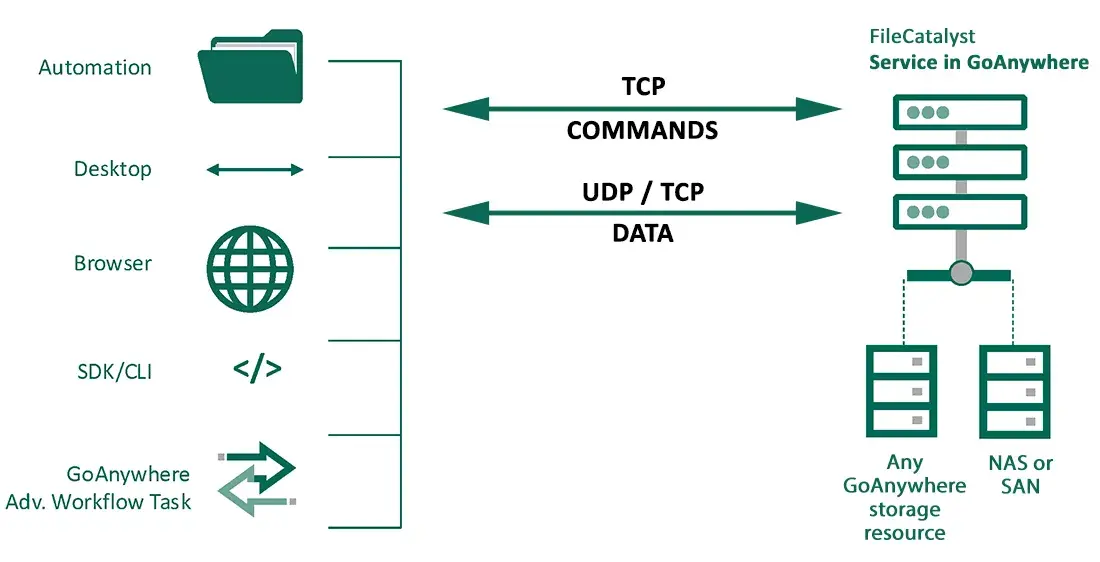
Client applications include:
- HotFolder: Automated scheduled transfers with folder synchronization
- Express: Desktop client for manual processes, similar to FileZilla
- TransferAgent Deployment Package: Browser-based Web plugin supporting upload, download, and two-way transfers. (Webclient integration coming in early 2027.)
- Development Tools: Command Line interface, Java, and RESTfull Client API for deeper integration
- GoAnywhere: Advanced Workflows tasks available in both the server and Agents
TCP or UDP
Multiple data blocks can be transferred at once via UDP for long-distance connections, or via TCP for shorter distances to achieve multi-stream TCP acceleration.
Guaranteed Delivery
If any parts of a file do not reach the destination successfully, the sender will be instructed to retransmit those missing parts until the entire file is received. To further guarantee the integrity of the transmission, checksums (hashes) can be calculated on both the FileCatalyst Service and client for the files transferred. The blocks are automatically resent if the client and server checksums do not match.
And at the end of the transfer, FileCatalyst can perform a complete disk-to-disk file content comparison using a Fast MD5 algorithm. This file verification can further ensure the data integrity of huge files.
Encryption
A FileCatalyst Service session can be configured to use AES encryption for protecting data packets, which is important when sending confidential files over the internet or other unsecured networks. AES is a popular encryption standard and is approved by the National Institute of Standards and Technology (NIST) for protecting top-secret information and is FIPS 140-3 compliant. If you are transmitting data over protected networks, you can disable encryption to further optimize transfer speeds.
Compression
Data can optionally be compressed with the ZIP or LMZA standards to minimize the amount of bandwidth utilized by FileCatalyst Service transmissions. Compression level can be set from 0 (none) to 9 Nine for maximum compression, which can be selected by the administrator at the time of transmission. FileCatalyst also supports transferring only the changes of a file using the delta option (sometimes known as rsync).
Additional Features of Accelerated File Transfer
- Schedule accelerated file transfers to run automatically
- Directory streaming allows for instant start of file transfers, even if the data set is well into millions of files.
- Auto-retry failed connections with user-specified thresholds
- Auto-resume failed transmissions when the server becomes available
- Encrypt data packets with AES-128, AES-192 and AES-256-bit ciphers, with FIPS 140-3
- Bandwidth scheduling. For example, slow down the file transfers during business hours.
- Suffix and prefix file names with constants, timestamps or variables
- Override file names and other properties at execution time using variables
- Auto rename files if they already exist at the destination location
- Configure port ranges used by the FileCatalyst Service server
- Send alerts for transfer failures via email, text messages and system messages
- Log all FileCatalyst Service file transfers in a central database for auditing and reporting
- Full compatibility with GoAnywhere Gateway.
FileCatalyst Service Workflows
The server connections can be pre-defined in GoAnywhere MFT's Administrator as reusable Resources which can be selected from simple drop-down menus. FileCatalyst Service Tasks can be placed within GoAnywhere MFT workflows and executed as part of a cohesive process. For instance, a workflow could be defined to retrieve a video file, encrypt the video, and then quickly send the video to a trading partner using the FileCatalyst Service accelerated file transfer protocol.
In the example below, an Administrator is using a FileCatalyst Service task to upload a video file to a trading partner:
